
This guide explains how to export Issue History for Jira app report data via API and automatically import it into Google Sheets.
Overview
With the API-based data source:
-
Data is generated on demand when the API is called
-
Access is secured via OAuth tokens
-
The response format remains JSON
-
You can connect it directly to Google Sheets using Apps Script
🔐 Step 1: Enable API Access
-
Go to Apps -> Manage apps ->Connected Apps, search for Issue History for Jira (Work Item History), and click on View app details.
-
In the app Details menu, enable the REST APIs option.
.png?cb=93162a9af6dcb3621917c330e6afa0ca)
🔗 Step 2: Generate Data Source Link
-
Open your Issue History for Jira app report.
-
Click API button.
.png?cb=6cd463e1c8d84207aaafbf74be07e36f)
-
Open the Data sources window.
-
Choose the saved view, then click Create data source link.
.png?cb=91b8b0c742b0f102e672373974048248)
👉 You will receive a new API URL like:
https://<site-name>/gateway/api/svc/<product>/apps/<app-id>/<path>
📌 This link is used to fetch your history report data.
🔑 Step 3: Authorize & Get Tokens
-
Click Authorize.
-
Approve access on the Atlassian consent screen.
-
After redirect, copy the Authorization Code.
⚠️ Important:
-
Code expires in 5 minutes.
.png?cb=839496aa0e5611d7111027635370c6a2)
Exchange Code for Tokens
.png?cb=98d09bdefa0b3b32b84763c3ae147847)
Use a tool like Postman to get:
-
Access Token (valid for 1 hour)
-
Refresh Token (valid for 90 days)
These tokens are required for API requests.
.png?cb=a87e631f9ef84dbbb527136e1fccd753)
📊 Step 4: Import Data into Google Sheets
Quick Setup
-
Open Google Sheets.
-
Go to Extensions → Apps Script.
.png?cb=c0a957b5b237a03d075b285c59035cc6)
-
Paste the provided script
// ============================================================
//  JIRA → Google Sheets  |  OAuth 3LO with token refresh
//  Paste this entire file into Apps Script (Extensions → Apps Script)
// ============================================================

// ── 1. CONFIGURATION ────────────────────────────────────────
// Fill in your values here. Leave tokens blank if you prefer
// to set them via the menu (recommended for security).

const CONFIG = {
  // Your Atlassian OAuth 2.0 app credentials
  // Found at: https://developer.atlassian.com/console/myapps/
  CLIENT_ID:     "",   // e.g. "m507qTf5IM8PNpE0WCYKyEj0RQYddbGq"
  CLIENT_SECRET: "",   // e.g. "ATOAxxxxxx..."

  // Name of the sheet tab where data will be written
  SHEET_NAME: "Jira Data",
};

// NOTE: DATA_SOURCE_URL is stored securely in Script Properties.
// Set it via: 🔄 Issue History API → ⚙️ Save Data Source URL

// Atlassian token endpoint
const TOKEN_URL = "https://auth.atlassian.com/oauth/token";

// ── 2. TOKEN HELPERS (stored securely in Script Properties) ──

function getProps() {
  return PropertiesService.getScriptProperties();
}

function saveTokens(accessToken, refreshToken) {
  const props = getProps();
  props.setProperty("ACCESS_TOKEN",  accessToken);
  props.setProperty("REFRESH_TOKEN", refreshToken);
  Logger.log("✅ Tokens saved to Script Properties.");
}

function getAccessToken()  { return getProps().getProperty("ACCESS_TOKEN");  }
function getRefreshToken() { return getProps().getProperty("REFRESH_TOKEN"); }
function getDataSourceUrl()  { return getProps().getProperty("DATA_SOURCE_URL");  }

// ── 3. TOKEN EXPIRY CHECK ─────────────────────────────────────

// How many days before expiry to start warning
const WARN_DAYS_BEFORE = 7;

/**
 * Decodes a JWT and returns its payload as an object.
 * Works without any external library — JWTs are just base64url-encoded JSON.
 */
function decodeJwtPayload(token) {
  try {
    const base64Url = token.split(".")[1];
    // base64url → base64
    const base64 = base64Url.replace(/-/g, "+").replace(/_/g, "/");
    const json    = Utilities.newBlob(Utilities.base64Decode(base64)).getDataAsString();
    return JSON.parse(json);
  } catch (e) {
    Logger.log("⚠️ Could not decode JWT: " + e.message);
    return null;
  }
}

/**
 * Returns the number of days until the refresh token expires.
 * Returns null if the token cannot be decoded.
 */
function getRefreshTokenDaysLeft() {
  const token = getRefreshToken();
  if (!token) return null;

  const payload = decodeJwtPayload(token);
  if (!payload || !payload.exp) return null;

  const expiresAt  = new Date(payload.exp * 1000);
  const now        = new Date();
  const msLeft     = expiresAt - now;
  return Math.floor(msLeft / (1000 * 60 * 60 * 24));
}

/**
 * Checks the refresh token expiry and:
 *  - Sends an email warning if within WARN_DAYS_BEFORE days
 *  - Shows a popup if called from the UI (showUiAlert = true)
 * Called automatically by syncJiraData() and by the daily warning trigger.
 */
function checkTokenExpiry(showUiAlert) {
  const daysLeft = getRefreshTokenDaysLeft();

  if (daysLeft === null) {
    Logger.log("⚠️ Could not determine refresh token expiry.");
    return;
  }

  const expiryDate = new Date(decodeJwtPayload(getRefreshToken()).exp * 1000)
    .toLocaleDateString();

  Logger.log(`ℹ️ Refresh token expires in ${daysLeft} day(s) (${expiryDate}).`);

  if (daysLeft < 0) {
    const msg = `🔴 Your refresh token EXPIRED on ${expiryDate}.\nYou must re-authorize via the 3LO flow and save new tokens.`;
    Logger.log("🔴 " + msg);
    if (showUiAlert) SpreadsheetApp.getUi().alert("Token Expired ❌", msg, SpreadsheetApp.getUi().ButtonSet.OK);
    sendExpiryEmail("EXPIRED", expiryDate, daysLeft);

  } else if (daysLeft <= WARN_DAYS_BEFORE) {
    const msg = `⚠️ Your refresh token expires in ${daysLeft} day(s) (${expiryDate}).\nPlease re-authorize soon and save new tokens via the menu.`;
    Logger.log("⚠️ " + msg);
    if (showUiAlert) SpreadsheetApp.getUi().alert("Token Expiry Warning ⚠️", msg, SpreadsheetApp.getUi().ButtonSet.OK);
    sendExpiryEmail("WARNING", expiryDate, daysLeft);
  }
}

/**
 * Sends an email to the script owner when the token is expiring soon or expired.
 * Only sends once per day to avoid spam (tracked via Script Properties).
 */
function sendExpiryEmail(type, expiryDate, daysLeft) {
  const props   = getProps();
  const today   = new Date().toDateString();
  const lastKey = "LAST_EXPIRY_EMAIL_" + type;

  // Don't send more than once per day
  if (props.getProperty(lastKey) === today) return;
  props.setProperty(lastKey, today);

  const email   = Session.getEffectiveUser().getEmail();
  const subject = type === "EXPIRED"
    ? "🔴 Issue History API: Refresh token has EXPIRED"
    : `⚠️ Issue History API: Refresh token expires in ${daysLeft} day(s)`;

  const body = type === "EXPIRED"
    ? `Your Issue History API refresh token expired on ${expiryDate}.\n\nThe daily sync has stopped working. Please re-authorize via the 3LO flow and save new tokens using:\n  🔄 Issue History API → ⚙️ Save tokens`
    : `Your Issue History API refresh token will expire on ${expiryDate} (in ${daysLeft} day(s)).\n\nPlease re-authorize soon via the 3LO flow and save new tokens using:\n  🔄 Issue History API → ⚙️ Save tokens`;

  GmailApp.sendEmail(email, subject, body);
  Logger.log(`📧 Expiry warning email sent to ${email}.`);
}

/**
 * Menu action: show token status in a popup.
 */
function showTokenStatus() {
  const daysLeft = getRefreshTokenDaysLeft();
  const ui = SpreadsheetApp.getUi();

  if (daysLeft === null) {
    ui.alert("Token Status", "No refresh token found. Please save your tokens via ⚙️ Save tokens.", ui.ButtonSet.OK);
    return;
  }

  const expiryDate = new Date(decodeJwtPayload(getRefreshToken()).exp * 1000).toLocaleDateString();

  let icon, status;
  if (daysLeft < 0) {
    icon = "🔴"; status = `EXPIRED on ${expiryDate}`;
  } else if (daysLeft <= WARN_DAYS_BEFORE) {
    icon = "⚠️"; status = `Expires in ${daysLeft} day(s) — ${expiryDate}`;
  } else {
    icon = "✅"; status = `Valid for ${daysLeft} more day(s) — expires ${expiryDate}`;
  }

  ui.alert("Token Status " + icon, `Refresh token: ${status}`, ui.ButtonSet.OK);
}

// ── 4. REFRESH THE ACCESS TOKEN ──────────────────────────────

function refreshAccessToken() {
  const refreshToken = getRefreshToken();
  if (!refreshToken) throw new Error("No refresh token stored. Run Setup → Save Tokens first.");

  const clientId     = CONFIG.CLIENT_ID     || getProps().getProperty("CLIENT_ID");
  const clientSecret = CONFIG.CLIENT_SECRET || getProps().getProperty("CLIENT_SECRET");
  if (!clientId || !clientSecret) {
    throw new Error("CLIENT_ID and CLIENT_SECRET are required. Set them in CONFIG or via the menu.");
  }

  const payload = {
    grant_type:    "refresh_token",
    client_id:     clientId,
    client_secret: clientSecret,
    refresh_token: refreshToken,
  };

  const response = UrlFetchApp.fetch(TOKEN_URL, {
    method:      "post",
    contentType: "application/x-www-form-urlencoded",
    payload:     payload,
    muteHttpExceptions: true,
  });

  const code = response.getResponseCode();
  const body = JSON.parse(response.getContentText());

  if (code !== 200) {
    throw new Error(`Token refresh failed (${code}): ${JSON.stringify(body)}`);
  }

  // Atlassian rotates the refresh token on each use
  saveTokens(body.access_token, body.refresh_token || refreshToken);
  Logger.log("🔄 Access token refreshed successfully.");
  return body.access_token;
}

// ── 4. FETCH DATA FROM THE API ───────────────────────────────

function fetchDataSource(accessToken) {
  const url = CONFIG.DATA_SOURCE_URL || getDataSourceUrl();
  if (!url) throw new Error("No Data Source URL stored. Use 🔄 Issue History API → ⚙️ Save Data Source URL.");

  const response = UrlFetchApp.fetch(url, {
    method:  "get",
    headers: { Authorization: "Bearer " + accessToken },
    muteHttpExceptions: true,
  });

  const code = response.getResponseCode();

  // 401 = token expired → refresh and retry once
  if (code === 401) {
    Logger.log("⚠️ Access token expired. Refreshing...");
    const newToken = refreshAccessToken();
    return fetchDataSource(newToken);
  }

  if (code !== 200) {
    throw new Error(`API request failed (${code}): ${response.getContentText()}`);
  }

  return JSON.parse(response.getContentText());
}

// ── 5. WRITE DATA TO SHEET ────────────────────────────────────

function writeToSheet(data) {
  const ss    = SpreadsheetApp.getActiveSpreadsheet();
  let   sheet = ss.getSheetByName(CONFIG.SHEET_NAME);

  // Create the sheet if it doesn't exist
  if (!sheet) {
    sheet = ss.insertSheet(CONFIG.SHEET_NAME);
    Logger.log(`📄 Created sheet: "${CONFIG.SHEET_NAME}"`);
  }

  sheet.clearContents();

  // ── Normalize the API response ──
  // The data source may return an array at the top level, or inside a key.
  // Adjust the path below if your source has a different structure.
  let rows = [];

  if (Array.isArray(data)) {
    rows = data;
  } else if (data.value && Array.isArray(data.value)) {
    rows = data.value;
  } else if (data.items && Array.isArray(data.items)) {
    rows = data.items;
  } else if (data.data && Array.isArray(data.data)) {
    rows = data.data;
  } else if (data.results && Array.isArray(data.results)) {
    rows = data.results;
  } else {
    // Fallback: write raw JSON so you can inspect the structure
    sheet.getRange(1, 1).setValue("Raw API Response (adjust writeToSheet to match your structure):");
    sheet.getRange(2, 1).setValue(JSON.stringify(data, null, 2));
    Logger.log("⚠️ Could not detect row array. Raw JSON written to sheet. Check the structure and update writeToSheet().");
    return;
  }

  if (rows.length === 0) {
    sheet.getRange(1, 1).setValue("No data returned by the API.");
    return;
  }

  // Build header row from the keys of the first object
  const headers = Object.keys(rows[0]);
  const output  = [headers];

  // Build data rows
  rows.forEach(row => {
    const rowValues = headers.map(h => {
      const val = row[h];
      return (val !== null && typeof val === "object") ? JSON.stringify(val) : val;
    });
    output.push(rowValues);
  });

  // Write everything in one call (fast)
  sheet.getRange(1, 1, output.length, output[0].length).setValues(output);

  // Style the header row
  const headerRange = sheet.getRange(1, 1, 1, headers.length);
  headerRange.setFontWeight("bold");
  headerRange.setBackground("#4a86e8");
  headerRange.setFontColor("#ffffff");
  sheet.setFrozenRows(1);
  sheet.autoResizeColumns(1, headers.length);

  // Timestamp
  sheet.getRange(output.length + 2, 1).setValue("Last updated: " + new Date().toLocaleString());

  Logger.log(`✅ Written ${rows.length} rows × ${headers.length} columns to "${CONFIG.SHEET_NAME}".`);
  SpreadsheetApp.getUi().alert(`✅ Done! ${rows.length} rows imported to "${CONFIG.SHEET_NAME}".`);
}

// ── 6. MAIN ENTRY POINT ───────────────────────────────────────

function syncJiraData() {
  try {
    let token = getAccessToken();
    if (!token) throw new Error("No access token stored. Use Setup → Save Tokens first.");

    const url = CONFIG.DATA_SOURCE_URL || getDataSourceUrl();
    if (!url) throw new Error("No Data Source URL stored. Use 🔄 Issue History API → ⚙️ Save Data Source URL.");

    // Warn if refresh token is close to expiry
    checkTokenExpiry(true);

    Logger.log("🚀 Fetching data from Jira data source...");
    const data = fetchDataSource(token);
    writeToSheet(data);
  } catch (e) {
    Logger.log("❌ Error: " + e.message);
    SpreadsheetApp.getUi().alert("❌ Error:\n\n" + e.message);
  }
}

// ── 7. MENU + SETUP UI ────────────────────────────────────────

function onOpen() {
  SpreadsheetApp.getUi()
    .createMenu("🔄 Issue History API")
    .addItem("Sync now",                    "syncJiraData")
    .addSeparator()
    .addItem("⚙️ Save tokens",              "promptSaveTokens")
    .addItem("⚙️ Save OAuth creds",         "promptSaveOAuthCreds")
    .addItem("⚙️ Save Data Source URL",     "promptSaveDataSourceUrl")
    .addSeparator()
    .addItem("🔑 Check token status",       "showTokenStatus")
    .addSeparator()
    .addItem("⏰ Schedule daily sync",      "createDailyTrigger")
    .addItem("⏰ Schedule expiry check",    "createExpiryCheckTrigger")
    .addItem("🗑️ Remove all triggers",     "removeAllTriggers")
    .addToUi();
}

function promptSaveTokens() {
  const ui = SpreadsheetApp.getUi();

  const accessResp = ui.prompt(
    "Save Access Token",
    "Paste your current access token:",
    ui.ButtonSet.OK_CANCEL
  );
  if (accessResp.getSelectedButton() !== ui.Button.OK) return;

  const refreshResp = ui.prompt(
    "Save Refresh Token",
    "Paste your refresh token:",
    ui.ButtonSet.OK_CANCEL
  );
  if (refreshResp.getSelectedButton() !== ui.Button.OK) return;

  saveTokens(accessResp.getResponseText().trim(), refreshResp.getResponseText().trim());
  ui.alert("✅ Tokens saved securely in Script Properties.");
}

function promptSaveOAuthCreds() {
  const ui = SpreadsheetApp.getUi();
  const props = getProps();

  const idResp = ui.prompt(
    "Save OAuth Client ID",
    "Paste your Atlassian OAuth Client ID:",
    ui.ButtonSet.OK_CANCEL
  );
  if (idResp.getSelectedButton() !== ui.Button.OK) return;

  const secResp = ui.prompt(
    "Save OAuth Client Secret",
    "Paste your Atlassian OAuth Client Secret:",
    ui.ButtonSet.OK_CANCEL
  );
  if (secResp.getSelectedButton() !== ui.Button.OK) return;

  props.setProperty("CLIENT_ID",     idResp.getResponseText().trim());
  props.setProperty("CLIENT_SECRET", secResp.getResponseText().trim());
  ui.alert("✅ OAuth credentials saved securely.");
}

function promptSaveDataSourceUrl() {
  const ui    = SpreadsheetApp.getUi();
  const props = getProps();

  // Pre-fill the current URL so the user can see and edit it
  const current = props.getProperty("DATA_SOURCE_URL") || "";
  const hint    = current
    ? "Current URL (paste a new one to replace it):\n" + current
    : "Paste the Data Source URL from your Jira report:";

  const resp = ui.prompt("Save Data Source URL", hint, ui.ButtonSet.OK_CANCEL);
  if (resp.getSelectedButton() !== ui.Button.OK) return;

  const newUrl = resp.getResponseText().trim();
  if (!newUrl) { ui.alert("No URL entered — nothing was saved."); return; }

  props.setProperty("DATA_SOURCE_URL", newUrl);
  ui.alert("✅ Data Source URL saved.\n\nYou can now run Sync now.");
}

// ── 8. TIME-BASED TRIGGERS ───────────────────────────────────

function createDailyTrigger() {
  // Remove existing sync triggers first to avoid duplicates
  ScriptApp.getProjectTriggers()
    .filter(t => t.getHandlerFunction() === "syncJiraData")
    .forEach(t => ScriptApp.deleteTrigger(t));

  ScriptApp.newTrigger("syncJiraData")
    .timeBased()
    .everyDays(1)
    .atHour(8)   // 08:00 in the script's timezone
    .create();

  SpreadsheetApp.getUi().alert("⏰ Daily sync scheduled for 8 AM.");
}

/**
 * Sets up a daily trigger that checks token expiry and sends
 * an email warning when the refresh token is close to expiring.
 */
function createExpiryCheckTrigger() {
  // Remove existing expiry check triggers first
  ScriptApp.getProjectTriggers()
    .filter(t => t.getHandlerFunction() === "dailyExpiryCheck")
    .forEach(t => ScriptApp.deleteTrigger(t));

  ScriptApp.newTrigger("dailyExpiryCheck")
    .timeBased()
    .everyDays(1)
    .atHour(9)   // 09:00 — runs after the sync trigger
    .create();

  SpreadsheetApp.getUi().alert("⏰ Daily token expiry check scheduled for 9 AM.\nYou will receive an email if the token is expiring within " + WARN_DAYS_BEFORE + " days.");
}

/**
 * Called by the daily expiry check trigger.
 * Does NOT show a UI popup (runs headlessly); sends email only.
 */
function dailyExpiryCheck() {
  checkTokenExpiry(false);
}

function removeAllTriggers() {
  ScriptApp.getProjectTriggers().forEach(t => ScriptApp.deleteTrigger(t));
  SpreadsheetApp.getUi().alert("🗑️ All triggers removed.");
}
-
Save and refresh the spreadsheet.
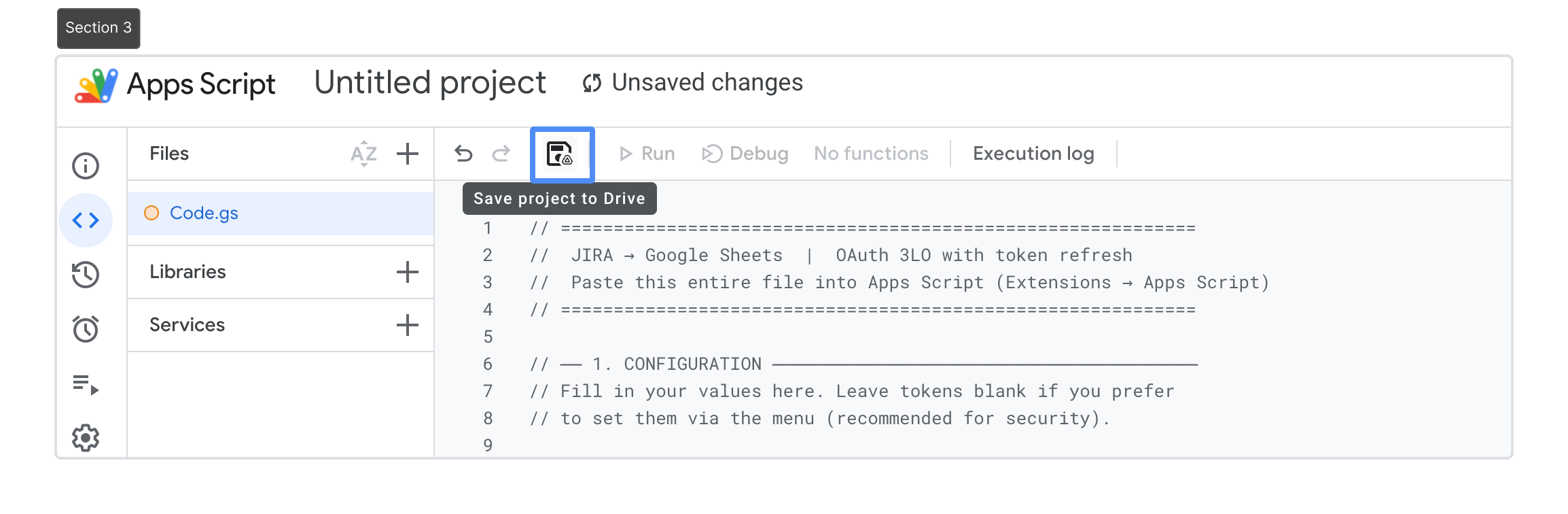
-
After refresh, you will see a new menu: 🔄 Issue History API
.png?cb=03ccc06a30a46205841a56d6c04548d8)
⚙️ Configure the Script
Note: Before configuring the script, make sure the script attached to the document has the necessary permissions to run. You will be asked to provide authorization before script configuration.
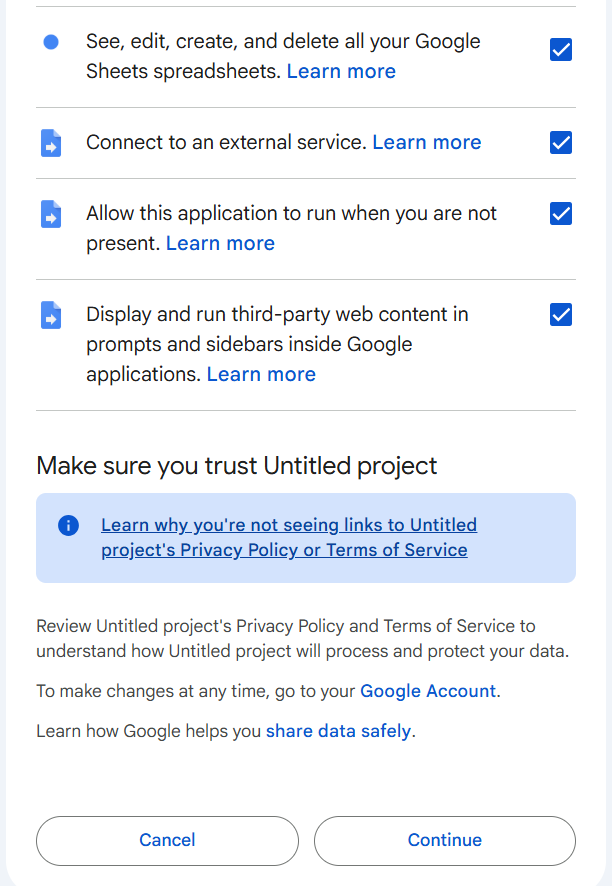
From the menu:
.png?cb=ea827af0009f8edeebd92c8b87e85317)
1. Save OAuth credentials
🔄 Issue History API → ⚙️ Save OAuth creds
Add from step 3:
-
Client ID
-
Client Secret
.png?cb=dbe011b1426cc9ada75ffd579c7826a4)
2. Save tokens
🔄 Issue History API → ⚙️ Save tokens
Add from step 3 (this is exactly what you exchanged in Postman):
-
Access token
-
Refresh token
3. Save Data Source URL
🔄 Issue History API → ⚙️ Save Data Source URL
Paste the API link you generated in step 2.
▶️ Step 5: Run the Import
Click:
🔄 Issue History API → Sync now
✔ The script will:
-
Fetch data from API
-
Automatically refresh expired tokens
-
Write structured data into your sheet
-
Format headers and add timestamp
For example, you’ll be able to retrieve such a report:
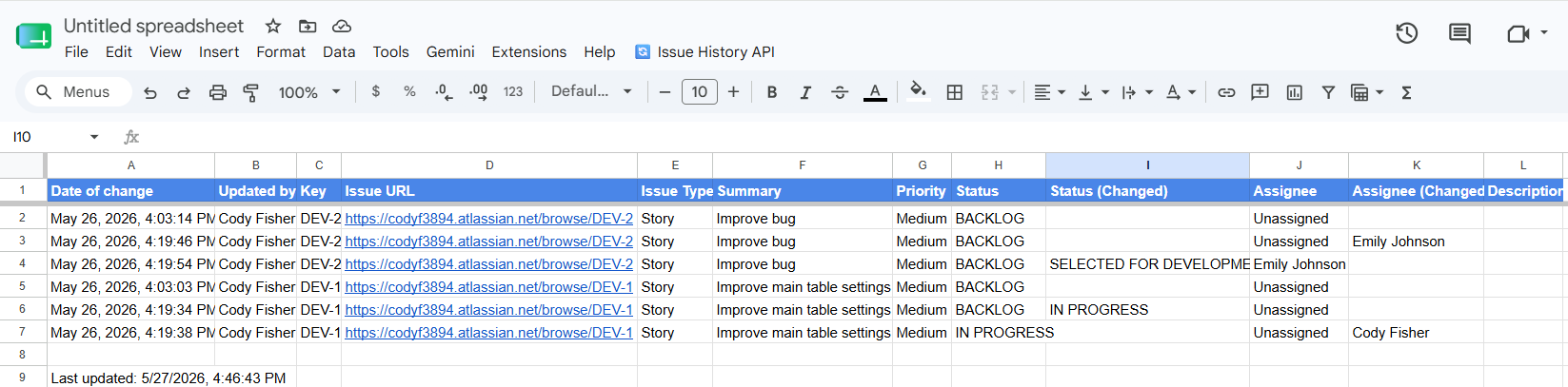
🔄 Automation (Optional)
You can automate syncing:
.png?cb=56007aa92b681d06c5ccf6718d2cf6e7)
Daily data refresh
🔄 Issue History API → ⏰ Schedule daily sync
the
Token expiration monitoring
🔄 Issue History API → ⏰ Schedule expiry check
✔ You’ll get email alerts if your token is about to expire.
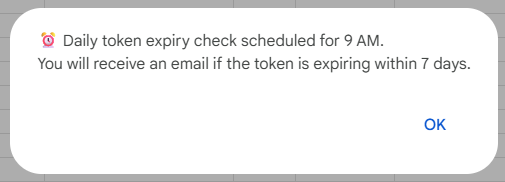
🔍 Token Management
-
Access token → expires in 1 hour
-
Refresh token → expires in 90 days
The script:
-
Automatically refreshes access tokens
-
Warns you before the refresh token expires
-
Sends email notifications if needed
⚠️ Limitations & Notes
-
Max request time: 25 seconds
-
Max payload: ~5 MB
-
Large reports may fail → narrow filters
-
Data visibility depends on user permissions
🛠 Troubleshooting
❌ No data returned
-
Check permissions in Jira
-
Verify the view is saved
-
Confirm the token is valid
❌ Token expired
-
Re-run authorization flow
-
Save new tokens
❌ Payload too large
-
Reduce:
-
Date range
-
Filters
-
💡 Pro Tip
Once set up, your Google Sheet becomes a live reporting dashboard that is automatically updated from Jira.
If you need help or want to ask questions, please contact SaaSJet Support or email us at support@saasjet.atlassian.net
Haven't used this app yet? 👉 Then you’re welcome to try it 🚀