
Overview
The Time Logging Limits feature allows administrators to control the retrospective period during which users can manage their worklogs. By setting a specific limit (in days), the system restricts users from adding, editing, or deleting time entries that are older than the defined period.
Configuration Guide
-
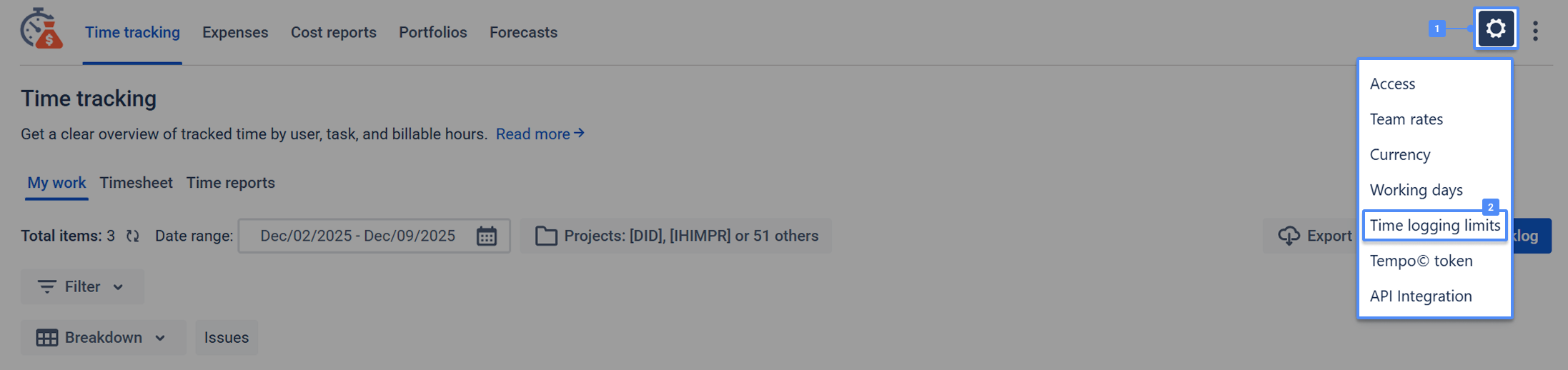
Access Settings: Navigate to the general settings by clicking the Gear icon (⚙️) on the toolbar.
-
Select Option: Select Time Logging Limits from the menu.
-
Set Restrictions:
-
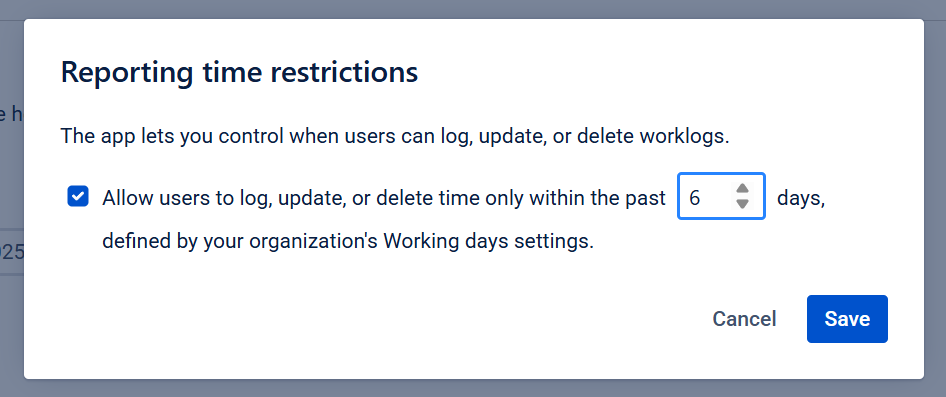
Check the box: "Allow users to log, update, or delete time only within the past [ ] days".
-
Enter the allowed number of days (e.g.,
6).
-
-
Save: Click the Save button.
If a user attempts to log or edit time for a date outside the allowed limit, the action is blocked, and the following error appears:
"You can log, edit, or delete worklogs only for the [N] past days from today."
.png?cb=4dfdd7613e4ae7a8c40a6851e4068bf8)
Use Case: Ensuring Billing Accuracy
-
Goal: Prevent changes to historical data that has already been invoiced to the client.
-
Scenario: The billing cycle closes at the end of the month. To protect this data, the Admin sets a 5-day limit.
-
Outcome: A user tries to edit a worklog from 2 weeks ago (outside the 5-day window). The system blocks the change, ensuring that the report in the system matches the invoice sent to the client.
If you need help or want to ask questions, please contact SaaSJet Support or email us at support@saasjet.atlassian.net .
Haven't used this app yet? Try it now! >>>