
This guide explains how to use the sorting feature to analyze your metrics, helping you identify tasks that took the most or least amount of time.
How to Sort Your Data
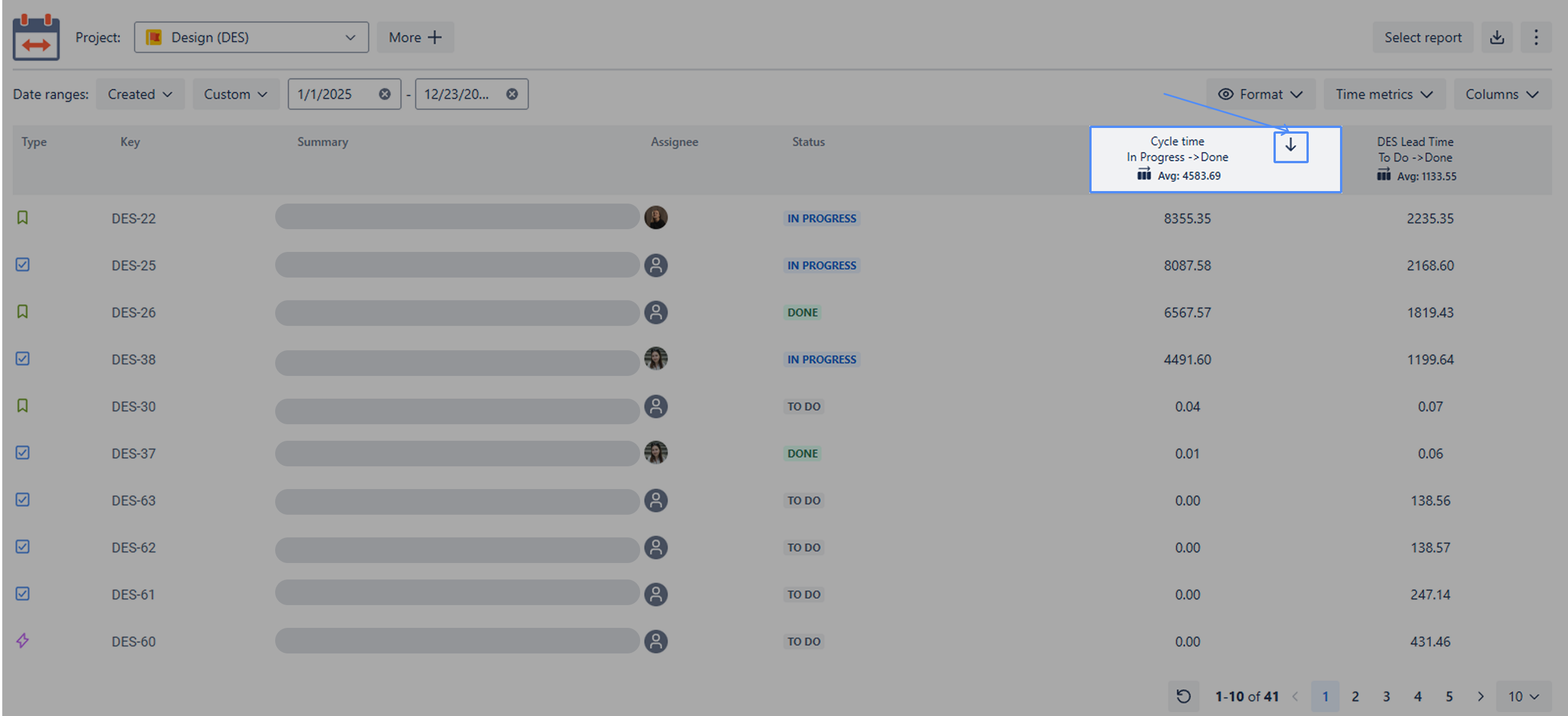
You can sort any column in your report to better organize your work items. To apply sorting, follow these steps:
-
Select a Column: Identify the column you wish to sort.
-
Hover and Click: Hover your mouse cursor over the column header. An arrow icon will appear.
-
Toggle Sort Order: * First Click: Sorts the data in descending order (arrow pointing down).
-
Second Click: Sorts the data in ascending order (arrow pointing up).
-
Important:
To ensure optimal performance, please keep the following limitations in mind:
-
Task Limit: Sorting is only available for datasets containing up to 2,000 tasks. If your report exceeds this limit, the sorting function will be disabled.
-
Metric Removal: If you remove a metric that is currently being used for sorting, the table will automatically revert to the default view: by work item keys.
If you need help or want to ask questions, please contact us through a SaaSJet Support or via email support@saasjet.atlassian.net
Haven’t worked with the app yet? Give it a try