
Filter work items by SLA data with JQL
Jira Query Language (JQL) can search work items using SLA fields indexed by SLA Time and Report. Use these fields in Advanced search, saved filters, boards, and dashboards.
A work item can have multiple SLA configurations and goals. JQL returns work items, not individual SLA records. When you combine several SLA conditions with AND, different conditions can match different SLAs on the same work item.
Prerequisites
Before using SLA fields in JQL:
-
Open Jira Advanced search and switch to Jira JQL.
-
Make sure SLA Time and Report is installed and SLA data is available for the work items you want to search.
If needed, see Atlassian’s JQL documentation for general JQL syntax.
Where to find SLA configuration and goal IDs in SLA Time and Report
Each SLA configuration and goal has its own ID. You can copy these IDs from the SLA configuration and use them with slaConfigId and slaGoalId in JQL.
To find the IDs:
-
Open SLA Time and Report in Jira.
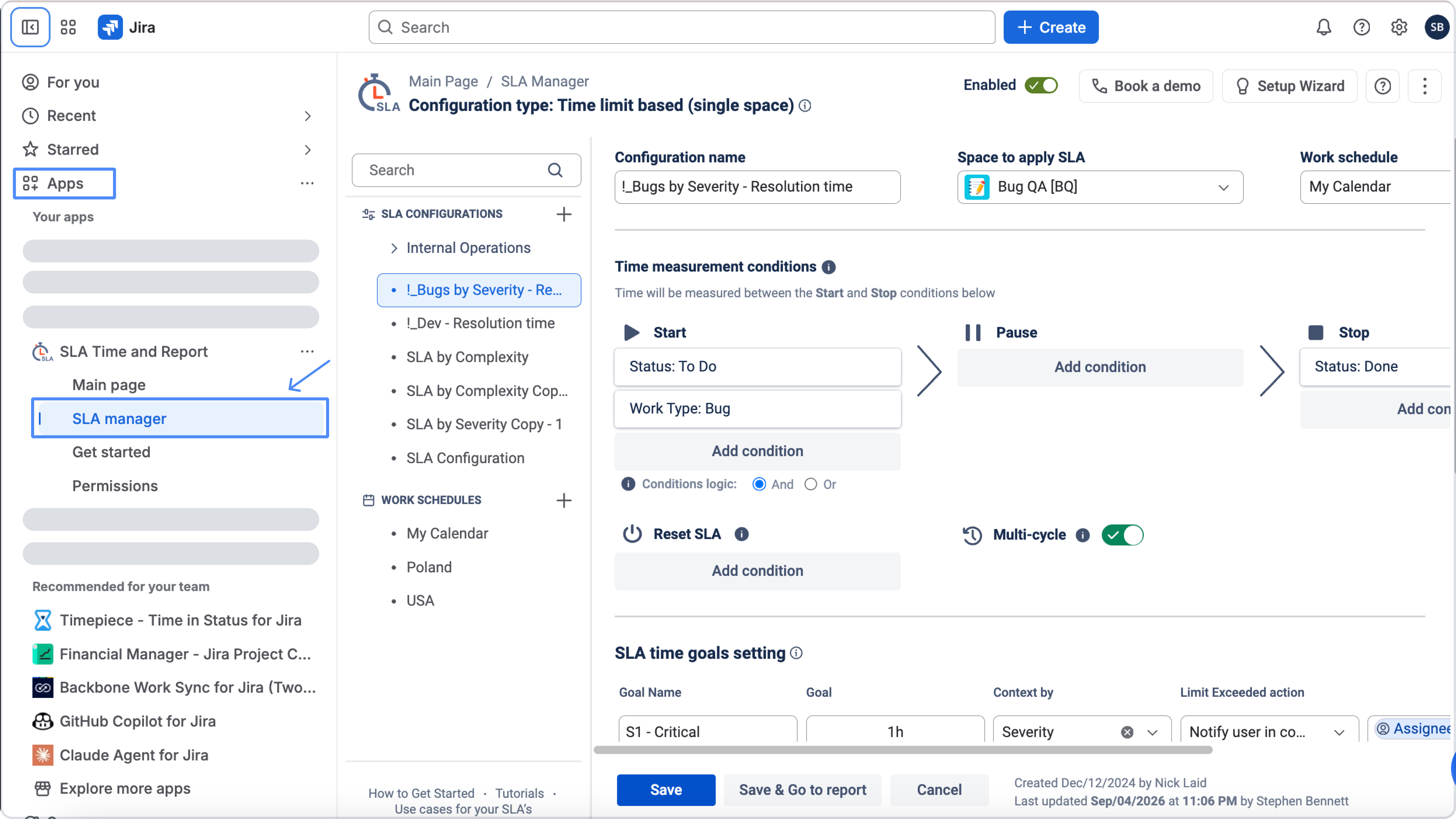
-
In the SLA Configuration manager, select the SLA configuration you want to use.
.jpg?cb=3525c69fd72b723a65368c286051e6eb)
-
Scroll down to the bottom of the configuration page.
.jpg?cb=78c38c9a0949b71cec719d4a556e863d)
-
Click the View SLA IDs icon.
.jpg?cb=d3b2c6c41fa276fed9dc721dd58bfa0d)
A modal window will open and display:
-
the SLA configuration ID
-
the SLA goal IDs for that configuration
You can then copy the required ID and use it in your JQL query.
Searchable SLA fields
|
Field |
Type |
Description |
Typical operators |
|---|---|---|---|
|
|
string |
SLA configuration ID |
|
|
|
string |
SLA goal (trigger) ID |
|
|
|
string |
Current SLA status (exact stored string) |
|
|
|
number |
Cumulative pause time for that SLA, in seconds |
|
|
|
number |
SLA start date |
|
|
|
number |
SLA target (due) date |
|
slaStatus is one string per SLA row. Compound states are stored as a single value (for example "In Progress, Exceeded"), not as an array. Match the whole string. Do not split it, use wildcards, or invent labels such as "Exceeded", "On pause", or "Complete".
Allowed slaStatus values
Use these strings exactly (case and punctuation must match):
|
Value |
Meaning |
|---|---|
|
|
Active SLA, running and not breached |
|
|
Active SLA, currently paused |
|
|
Active SLA, breached while still in progress |
|
|
Active SLA, breached and currently paused |
|
|
Finished: goal was met in time |
|
|
Finished: goal was breached, then completed |
|
|
Not applicable for that goal. Often the clock has not started yet. Treat separately from finished SLAs |
Exceeded never appears as the entire slaStatus value. slaStatus = "Exceeded" matches nothing useful. Always use one of the compound strings, or OR several of them.
In flight (clock or goal still in play): In Progress, In Progress, On Pause, In Progress, Exceeded, Exceeded, On Pause.
Finished (terminal): Met or Exceeded, Completed. NA is not a finished outcome.
Key rules
-
Quote every
slaStatus(and ID) literal. -
Combine independent conditions with
AND. Combine alternative statuses withOR, and wrapORgroups in parentheses. -
slaStatusdescribes now. It cannot tell you that an SLA was paused in the past. -
Historical pause:
slaPauseTime > 0(any cumulative pause). Never paused:slaPauseTime = 0. -
Currently paused: filter
slaStatus, not pause time. -
slaPauseTimeis seconds. One hour is3600. -
For a recent start window, use a relative duration such as
slaStartDate >= -1d. -
For a target (due) window in the last 24 hours (not in the future), use
slaTargetDate >= -1d AND slaTargetDate <= now().
Common examples
work items that breached SLA
Any exceeded outcome: still in progress, paused after breach, or completed after breach. Do not use slaStatus = "Exceeded".
(slaStatus = "In Progress, Exceeded" OR slaStatus = "Exceeded, On Pause" OR slaStatus = "Exceeded, Completed")
Only currently exceeded (still in flight, not yet completed):
(slaStatus = "In Progress, Exceeded" OR slaStatus = "Exceeded, On Pause")
work items that met SLA
Goal finished in time:
slaStatus = "Met"
work items where SLA is in progress
Running and not paused or exceeded:
slaStatus = "In Progress"
Filter by current status
In progress (running, not paused, not exceeded)
slaStatus = "In Progress"
In progress and exceeded
slaStatus = "In Progress, Exceeded"
Currently on pause (both pause variants)
The clock is paused now, whether or not the SLA is already exceeded:
(slaStatus = "In Progress, On Pause" OR slaStatus = "Exceeded, On Pause")
Only in-progress-and-paused:
slaStatus = "In Progress, On Pause"
Only exceeded while paused:
slaStatus = "Exceeded, On Pause"
Not currently on pause
Excludes the two pause statuses. The SLA may still have pause history (slaPauseTime can be greater than zero):
slaStatus != "In Progress, On Pause" AND slaStatus != "Exceeded, On Pause"
Exceeded while still active
Breached and still running or paused (not the finished exceeded outcome):
(slaStatus = "In Progress, Exceeded" OR slaStatus = "Exceeded, On Pause")
Any exceeded outcome, including finished after breach:
(slaStatus = "In Progress, Exceeded" OR slaStatus = "Exceeded, On Pause" OR slaStatus = "Exceeded, Completed")
Finished / completed
Terminal outcomes only — met in time, or exceeded then completed:
(slaStatus = "Met" OR slaStatus = "Exceeded, Completed")
Only met in time: slaStatus = "Met". Only breached then completed: slaStatus = "Exceeded, Completed".
Pause history vs current pause
|
Intent |
Field |
JQL |
|---|---|---|
|
On pause now |
|
|
|
Ever paused / had pause time (status may have changed) |
|
|
|
Never paused / no cumulative pause |
|
|
|
Pause longer than one hour |
|
|
|
Longest cumulative pause first |
|
|
work items with any recorded pause, longest pause first:
slaPauseTime > 0 ORDER BY slaPauseTime DESC
Wording like “wasn’t on pause” is ambiguous. Use slaPauseTime = 0 for never paused, and the two != status filters for not paused at the moment.
Filter by configuration or goal
Restrict to a configuration and/or goal, then add status (or other) conditions with AND.
Example: exceeded active SLAs for a given config and goal:
slaConfigId = "mock-config-id"
AND slaGoalId = "mock-goal-id"
AND (slaStatus = "In Progress, Exceeded" OR slaStatus = "Exceeded, On Pause")
Replace the mock IDs with the actual configuration and goal IDs from the app. See the instructions above (Where to find SLA configuration and goal IDs in SLA Time and Report) for where to find the required SLA IDs.
Because JQL matches at work item level, an work item with several SLAs can match slaConfigId from one row and slaStatus from another. Narrowing by both slaConfigId and slaGoalId reduces that risk when those IDs identify a single goal.
Filter by start or target date
Compare slaStartDate or slaTargetDate with a relative duration such as -1d.
SLAs started in the last 24 hours:
slaStartDate >= -1d
SLAs whose target (due) date is in the last 24 hours:
slaTargetDate >= -1d AND slaTargetDate <= now()
Already exceeded
SLA is already breached (any exceeded outcome), and the target date is in the past:
(slaStatus = "In Progress, Exceeded" OR slaStatus = "Exceeded, On Pause" OR slaStatus = "Exceeded, Completed")
AND slaTargetDate <= now()
Still exceeded and in flight (not completed):
(slaStatus = "In Progress, Exceeded" OR slaStatus = "Exceeded, On Pause")
AND slaTargetDate <= now()
Will exceed soon (still in progress)
Target date is in the future, and the SLA has not breached yet:
slaStatus = "In Progress"
AND slaTargetDate > now()
Due next calendar week:
slaStatus = "In Progress"
AND slaTargetDate >= startOfWeek(1)
AND slaTargetDate <= endOfWeek(1)
Include paused SLAs that are still on track for next week:
(slaStatus = "In Progress" OR slaStatus = "In Progress, On Pause")
AND slaTargetDate >= startOfWeek(1)
AND slaTargetDate <= endOfWeek(1)
Due today:
slaStatus = "In Progress"
AND slaTargetDate >= startOfDay()
AND slaTargetDate <= endOfDay()
Combining several SLA conditions
Use parentheses for OR groups, and AND to stack filters.
Example: work items that either finished after a breach, or are still exceeded while in progress, and that have recorded pause time:
(
  slaStatus = "Exceeded, Completed"
  OR slaStatus = "In Progress, Exceeded"
)
AND slaPauseTime > 0
Example: a specific goal, started recently, not currently paused:
slaGoalId = "mock-goal-id"
AND slaStartDate >= -1d
AND slaStatus != "In Progress, On Pause"
AND slaStatus != "Exceeded, On Pause"
Using these queries in Jira
-
Open Filters → Advanced work item search.
-
Switch to JQL.
-
Paste a query from this page and run it.
-
Save the filter if you need it on a board or dashboard.
You can also mix SLA fields with standard Jira clauses (project, assignee, status, and so on):
project = DEMO
AND assignee is not EMPTY
AND (slaStatus = "In Progress, Exceeded" OR slaStatus = "Exceeded, On Pause")
Need help?
Have questions or need help with SLA Time and Report? Contact our support team.
Want to see SLA Time and Report in action?
Book a demo with our team to explore your use case, or start a free trial to try the app in your Jira environment.