
This page answers the most common questions about using AI Apps Builder, deploying your apps, and managing permissions.
Is AI Apps Builder free to use?
AI Apps Builder is a free Jira app available on the Atlassian Marketplace. After installation, each user receives 50 credits to explore the product and create custom apps. Credits are used when sending messages in the AI chat. For details on the credit system, see Understanding Free Tier Usage Limits in AI Apps Builder.
Can I use AI Apps Builder without installing it in Jira?
Yes. AI Apps Builder has a standalone web version that lets you generate and preview apps entirely outside your Jira environment. You can build, iterate, and confirm everything works as expected, then install the finished Forge app into Jira when it's ready. This option is particularly relevant for teams with strict policies around installing third-party tools directly in their Jira instance.
Why do I need to use an API token?
You need to use your API token to deploy the app created with AI Apps Builder. The token is used only to authorize the installation of the generated Forge app to your specific Jira Cloud site.
The API token:
-
Is used only for deployment
-
Is not stored by AI Apps Builder
-
Is not used to access Jira data
-
Is not used at the app’s runtime
-
Is not used for analytics or data collection
-
Does not affect the app after deployment
Once deployment is complete, the app runs independently as a standard Forge app within your Jira environment. It does not rely on the API token in any way.
If the API token expires or is revoked, the deployed app will continue to function normally.
The token is simply a secure authentication mechanism required by Atlassian to authorize app deployment.
Can I deploy without sharing my API token through AI Apps Builder?
Yes. If your organization prefers to keep the deployment process fully under your own control, you can use manual deployment instead. Download the Forge installer, deploy the app yourself using the Forge CLI, and the API token never passes through the AI Apps Builder interface. This gives teams the flexibility to match their internal security policies.
Will my app stop working when the API token expires?
No. The API token is required only during deployment. Once your app is successfully deployed, it will continue working even if your API token expires or is removed. The API token's lifetime does not affect your app's lifetime.
What permissions do I need to deploy my app?
To deploy the Forge app generated with AI Apps Builder, you must have administrator permissions on the Jira site where the app will run.
Does AI Apps Builder access my Jira data?
No. When you use AI Apps Builder to generate a custom Jira app, the AI reads your prompt and generates a Forge app based on Atlassian's Forge documentation. It does not connect to your Jira issues, projects, or data. You never need to grant AI direct access to your Jira instance.
Are my prompts used to train AI models?
No. Neither Anthropic (the AI provider behind AI Apps Builder) nor the AI Apps Builder team uses your prompts or generated outputs for model training. What you describe to generate an app does not feed back into improving the model. This means describing your internal processes or workflows to build a custom app does not expose that information to future users of the system.
Where is my app's data stored?
Apps generated with AI Apps Builder run on Atlassian Forge and use Forge-hosted storage. This means your data stays inside Atlassian's cloud infrastructure — not on any AI Apps Builder servers. Each Jira site gets its own isolated storage space, so one company's data is never mixed with another's. Data is encrypted at rest and backed up by Atlassian.
If your Jira instance is pinned to a specific data residency region (for example, EU or US), Forge-hosted app data follows that setting automatically.
The one exception: if an app makes calls to external services (such as third-party APIs), data that leaves Forge falls outside Atlassian's infrastructure. In that case, you are responsible for the residency, security, and deletion of that external data.
Who is responsible for the security of my app — Atlassian or us?
Forge uses a shared responsibility model. Atlassian is responsible for the platform infrastructure, managed storage and encryption, backups of Forge-stored data, and SOC 2 and ISO 27001 certifications at the platform level. You are responsible for writing secure app code, choosing and minimizing scopes, preventing cross-tenant data leaks in your app logic, defining any data sent to external services, and your organization's broader compliance requirements. In short: Atlassian secures and operates the Forge platform. You are responsible for how your app uses that platform.
What if I am not a Jira administrator? Can I create and deploy my app?
Yes, you can. If you are not an admin, add your admin to the chat to complete deployment. Follow this guide: How to Invite a Jira Admin to Deploy Your App or Agent.
Can I share access to my generated app with other users?
Yes. You can give access to additional users by adding them as Contributors in the Atlassian Developer Console. This allows others to help manage or work with your app. To learn how to do this, see our documentation: Managing Forge Apps - Atlassian Developer Console.
Can I continue working on my app after I deploy it?
Yes, you can continue improving your app after deployment. You can refine the UI, update the logic, or add new features to your existing app. Please note that any changes you make will only appear in Jira after you redeploy the app.
Can I build more than one module or page inside a single app?
Yes, you can. AI Apps Builder lets you create multiple modules or pages in one app, including dashboards, configuration pages, reporting views, or any modules your workflow needs. AI Apps Builder supports 31 modules across Jira Core, Jira Service Management, and automation triggers.
Where can I find the apps I have created with AI Apps Builder and deployed?
You can find all the apps you created with AI Apps Builder directly in your Jira site. To learn more, please read our documentation page: How to Access the Apps You’ve Built with AI Apps Builder.
Can I view or download the generated code?
Yes. On the deployment page, you can download a ZIP file with the full source code of your generated app.
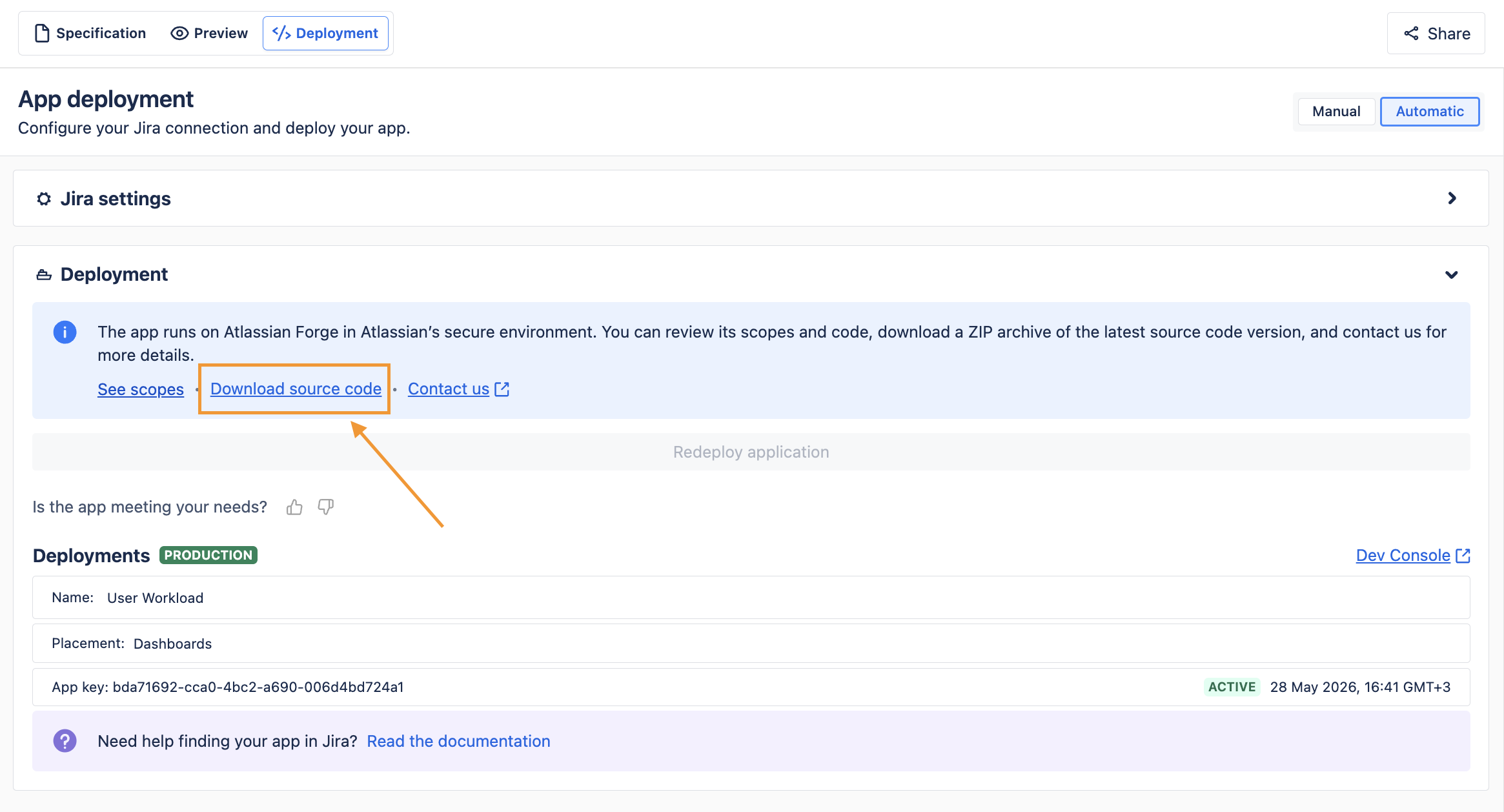
This is useful when you want to review the code, learn from the structure, or share it with a developer.
How can I write better prompts in AI Apps Builder?
Learn how to write clearer, more effective prompts with proven techniques and practical examples in our guide: How to Write Effective AI Prompts: Best Practices and Practical Examples.
Do I need to pay for my own Forge app?
Yes. If you create and use your own Forge app, you are responsible for any costs related to Atlassian Forge usage. Here’s an overview of Forge pricing starting January 2026.
|
Category |
What's Measured |
Free Monthly Allowance |
Price Beyond Free Tier |
|
Compute |
Function execution time |
100,000 GB-seconds |
$0.000025 / GB-second |
|
KVS Read |
Reading from Forge Storage |
0.1 GB |
$0.055 / GB |
|
KVS Write |
Writing to Forge Storage |
0.1 GB |
$1.09 / GB |
|
Logs |
App log output |
1 GB |
$1.005 / GB |
|
SQL Compute |
SQL execution time |
1 hour |
$0.143 / hour |
|
SQL Requests |
Number of SQL queries |
100,000 requests |
$1.929 / million requests |
|
SQL Storage |
Stored SQL data |
730 GB-hours |
$0.00076850 / GB-hour |
If you have any questions, feedback, or ideas, just contact SaaSJet Support or email us at support@saasjet.com. We’re always happy to help.
Haven't used AI Apps Builder yet? You're welcome to try it then!