
Overview
Every SaaS company, regardless of how innovative its product is or how talented its engineers are, ultimately worries about two key factors: time and cost.
Running a SaaS product team isn’t just about planning sprints and shipping features — it’s about balancing velocity, delivery, and strict budget limits.
🚧 Challenges SaaS Teams Face
-
Lack of visibility into the true cost of features or releases.
-
Budgets are spread across multiple departments without clear ownership.
-
Finance teams struggle to connect worklogs with financial metrics.
-
Reporting for stakeholders or investors is time-consuming and scattered.
🎯 Goals
-
Track time spent on engineering, design, QA directly in Jira.
-
Convert hours into financial data for budgeting & forecasting.
-
Ensure cost transparency across departments.
-
Provide clear reports for executives and investors.
How Time & Cost Tracker Helps
🔮 Forecast & Budget – Plan costs for sprints, releases, or departments.
⏱ Track Time – Log hours in Jira; automatically convert to money.
📊 Monitor – Compare forecasts vs. actuals in real time.
💰 Cost Reports – See labor and direct expenses by project or team.
📑 Share Insights – Export reports for finance, executives, and investors.
⚙️ Step-by-Step Workflow
1. Sprint Planning, Forecasting & Budgeting
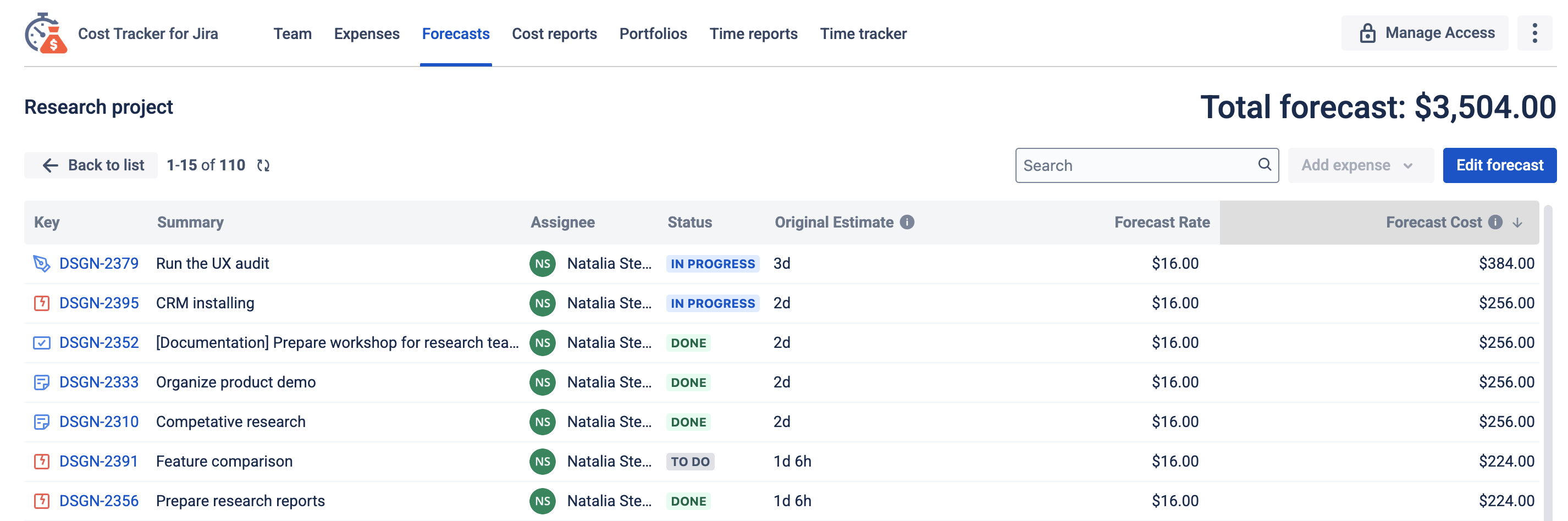
Managers start by creating a forecast to estimate the expected time and cost for an upcoming release, feature, or department workload.
Forecasts leverage Jira estimates and team rates to provide a comprehensive view of projected expenses. This gives teams:
-
Cost projections – forecasts based on current team rates and estimates.
-
Enhanced budget control – projected costs can be monitored against budgets.
-
Informed decisions – clear visibility of future costs helps adjust timelines, resources, and scope.
The result: a baseline of planned spending that can later be compared with actuals for accurate budget control.
2. Team Time Tracking
-
Engineers, designers, and QA log their time directly in Jira.
-
Logged time is automatically converted into money based on each employee’s defined rate.
Managers no longer just see hours — they see the real financial impact.

3. Real-Time Monitoring
-
Managers compare the forecast with actual spending.
-
A cost report is generated and compared against the original forecast.
If any team exceeds the budget (e.g., QA spends twice the planned hours), the system flags it early — before the sprint ends.
4. Cost Reports
At the end of each sprint or release, managers generate a Cost Report that provides a full picture of actual project expenses.
The report has two main components:
-
Labor costs – calculated as all reported work logs within the selected period multiplied by the hourly rates of each employee. In other words, every logged hour is automatically converted into money.
-
Direct expenses – manually added records of all payments made by the team during the same period (e.g., hosting, licenses, APIs, marketing).
When generating the report, managers can configure:
-
Scope (Filter) – which issues to include.
-
Default hourly rate – a fallback rate for users without a defined rate.
-
Report start/end date – the time range for work logs and expenses.
-
Planned time & budget – to compare against actual results.
Revenue tracking & invoicing – optional settings for financial planning.
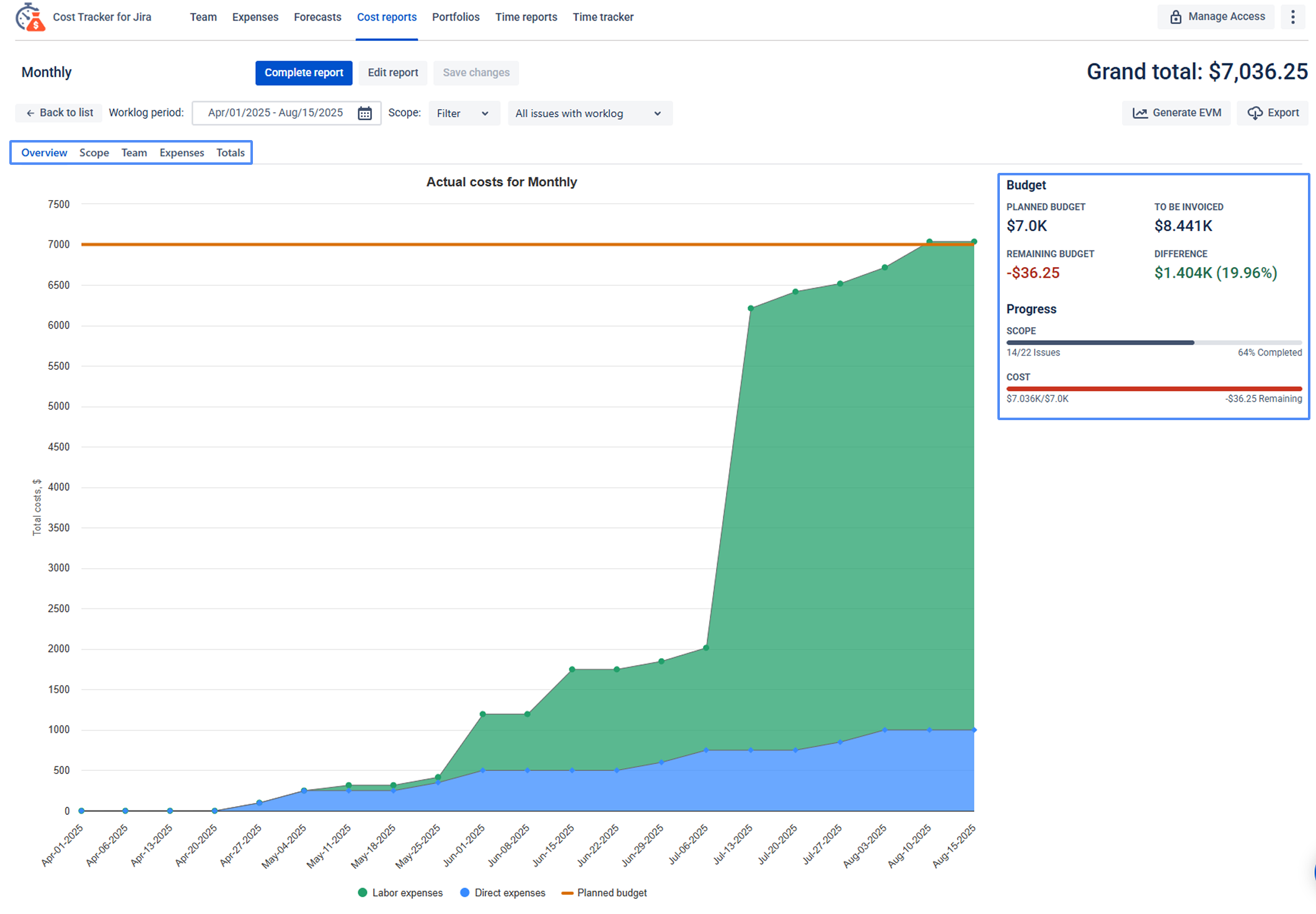
The Cost Report includes five tabs for different perspectives:
-
Overview – charts showing labor costs, direct expenses, and planned budget.
-
Scope – list of issues with logged work and calculated costs.
-
Team – breakdown of hours and costs per user.
-
Expenses – detailed list of direct expenses within the period.
-
Totals – final summary of both labor and direct expenses.
This dual-structured report ensures both direct team efforts (labor costs) and operational payments (direct expenses) are tracked together, giving Finance and PMs a transparent, data-driven view of total spending.
5. Strategic Reporting
-
Reports are exported and shared with executives and investors.
-
This provides transparent communication with stakeholders and ensures alignment between product and finance.
If you need help or have questions, please contact SaaSJet Support or email us at support@saasjet.atlassian.net.
Haven't used this app yet? Try it now! >>>