
Taking screenshots without adding annotations is a somewhat meaningless process.
Therefore, we have implemented the Page Marker function in Issue Creator.
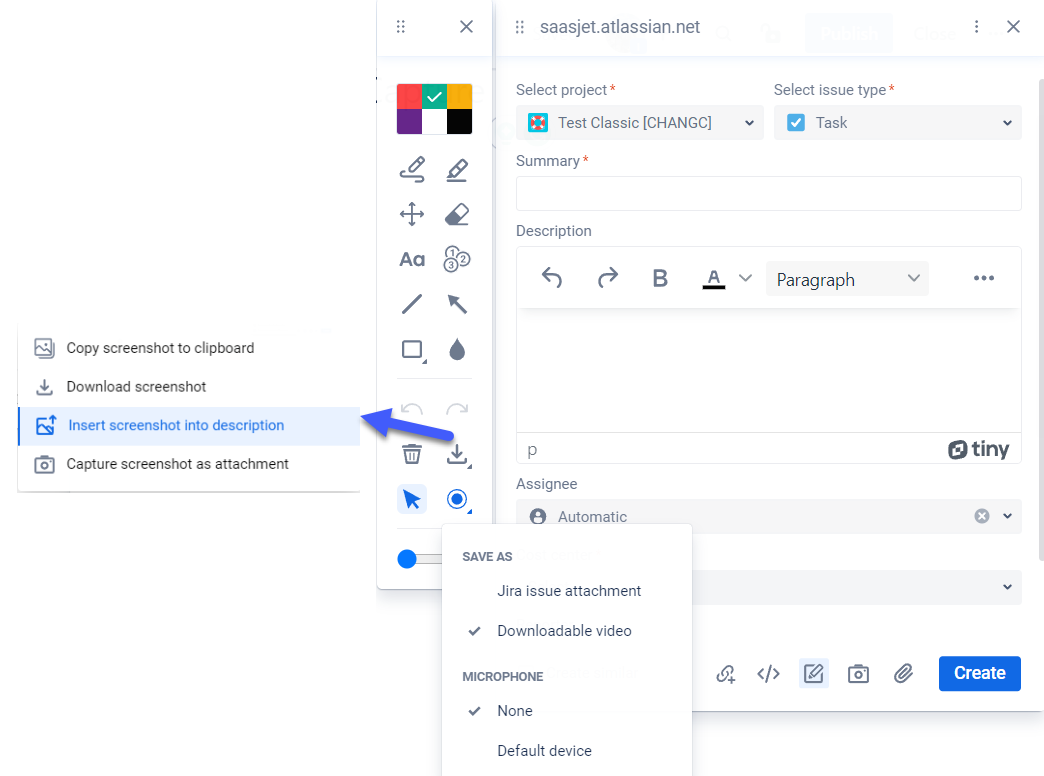
So, here's the list of available tools:
-
A palette of popular colors.
-
Pen and highlighter tools.
-
Options to move the added annotations.
-
Wipe if you need to correct something.
-
Adding text.
-
Step stamps.
-
Geometric shapes - line, square (filled/unfilled), circle (filled/unfilled).
-
Add arrows.
-
Blur.
-
Undo|redo options for previous actions.
-
Delete all annotations.
-
Screenshot management - copying to clipboard, downloading to a computer, inserting into the task descriptor, attaching as an attachment.
-
Screen recorder tool - up to 3 minutes (save as a file or attach it to Jira issue). Ability to record audio from a microphone.
If you need help or want to ask questions, please contact SaaSJet Support or email us at support@saasjet.atlassian.net