
How to Increase Delivery Orders and Reduce Shipment Delays
For online retailers and marketplace sellers, delivery speed and reliability have a direct impact on revenue. Late shipments, unclear order statuses, or missed handoffs don’t just create frustration — they weaken customer trust, reduce repeat purchases, and hurt conversion rates. If you’re wondering how to increase delivery orders sustainably, the answer often starts with improving fulfillment visibility.
Fast, predictable delivery has become one of the strongest drivers of online sales. Customers are far more likely to complete a purchase when they trust their order will arrive on time. On the other hand, delays quickly result in cart abandonment, negative reviews, and fewer returning buyers.

So the real question is:
How can you make deliveries faster and more predictable without creating operational chaos?
Why Faster Delivery Drives More Orders
When customers clearly understand when their order will arrive, they feel confident placing it. This is especially critical for online stores and Amazon sellers, where shipping speed and reliability strongly influence buying decisions.
Interestingly, most delivery delays don’t start during shipping. They begin much earlier, inside the fulfillment workflow, and remain invisible without time-based tracking.
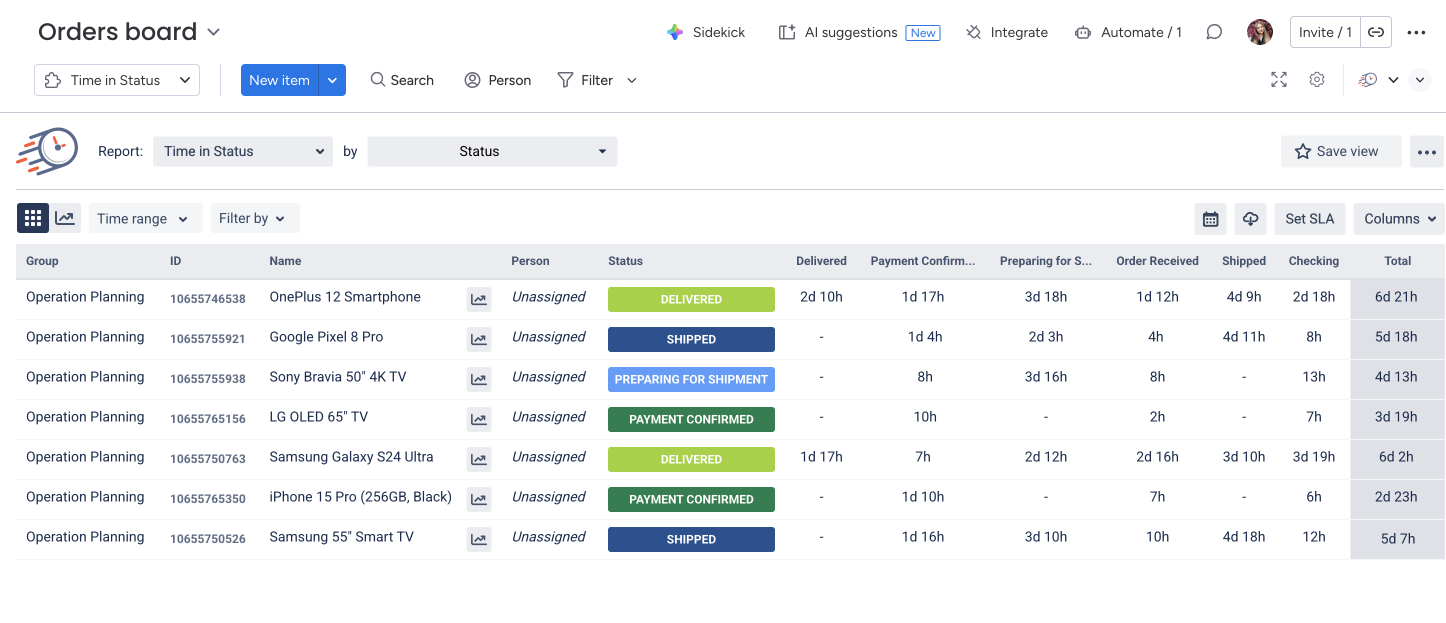
With Time in Status for monday , teams gain clear insight into where orders slow down and how long they remain in each stage. Instead of guessing, you can see exactly when:
Orders stay too long in preparation
Shipping handoffs are delayed
Cancellations or customer refusals are noticed too late
Teams rely on spreadsheets that show status but not time
Without tracking duration per status, these issues remain hidden until customers complain. Time in Status makes delays visible early, before they impact trust and order volume.
Using SLA Rules to Flag Risky Orders
To make at-risk orders even easier to detect, Time in Status allows you to set SLA thresholds for key fulfillment stages.
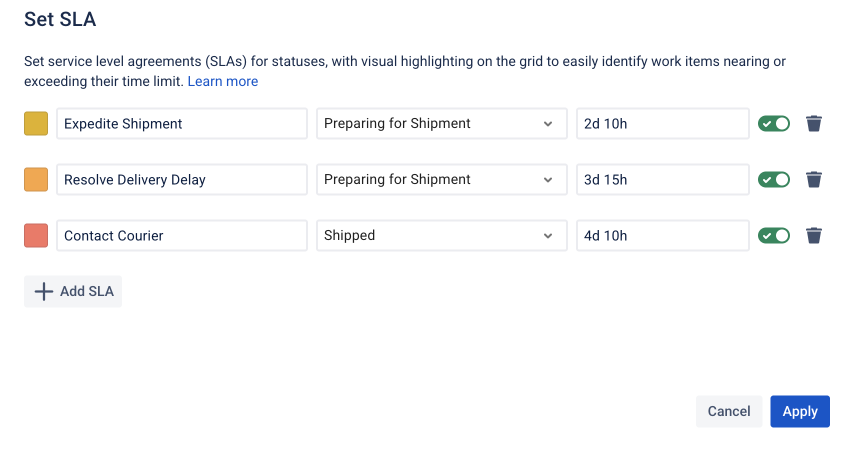
For example:
“Preparing for shipment” must not exceed 24 hours
“Shipped” should move to “Delivered” within a defined timeframe
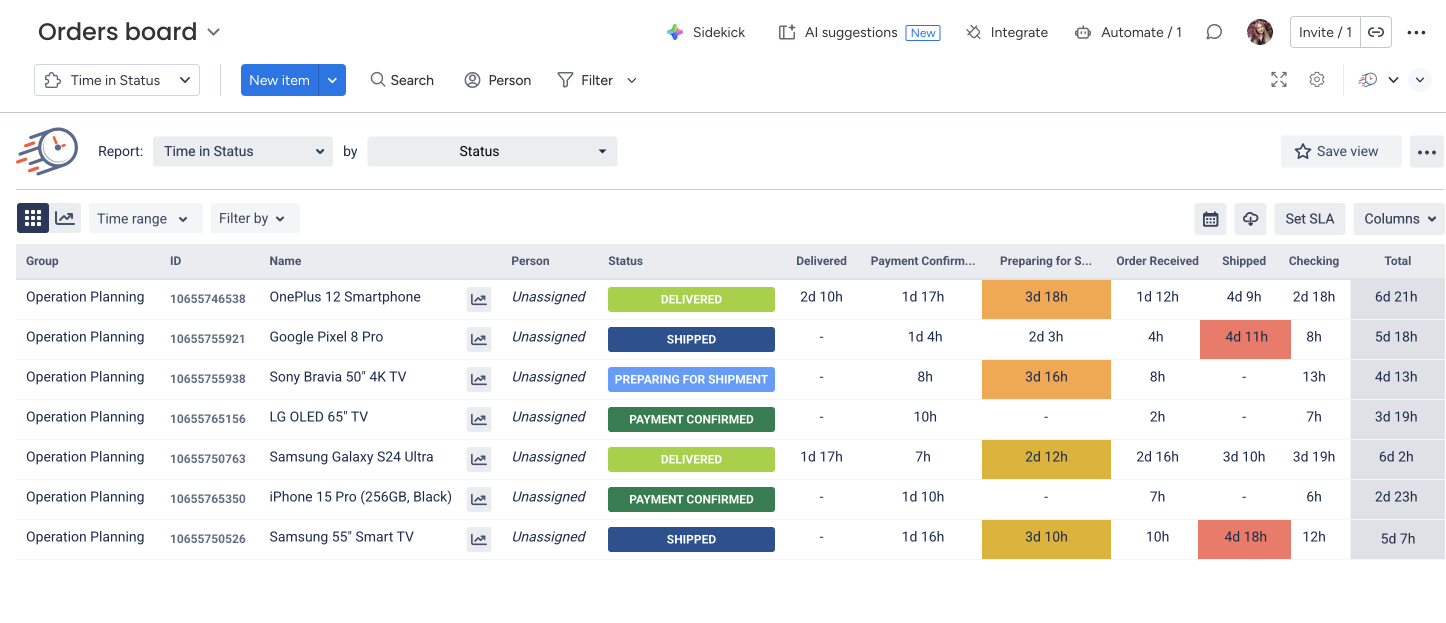
When an order exceeds these limits, it’s automatically highlighted on the board. These visual alerts help teams prioritize urgent cases immediately.
Many teams begin with a purchase order tracking spreadsheet. While spreadsheets can show current status, they don’t reveal how long an order has been waiting.
Tracking Orders from Purchase to Delivery
Once connected to your workflow, Time in Status automatically tracks every order from creation to completion.
Typical stages might include:
Order received
Payment confirmed
Preparing for shipment
Shipped
Delivered
Cancelled / Customer declined
Instead of manually checking timestamps, teams instantly see:
How long orders wait before shipment
Where preparation slows down
When delivery exceeds expected timelines
If an order remains in one stage too long, it becomes visible immediately, long before customers raise concerns.
Preventing the Delays Customers Notice Most
One of the biggest frustrations for online shoppers is uncertainty. Situations like unexpected delivery date changes reduce trust and discourage repeat purchases.
With time-based monitoring, teams can:
Detect delays early
Reprioritize orders at risk
Communicate accurate delivery expectations
Reduce last-minute delivery changes
This directly improves customer confidence and supports the goal of increasing delivery orders.
Operational Clarity Leads to Business Growth
Delivery issues rarely start with a single major failure. They build quietly when orders sit too long in one step without anyone noticing.
With Time in Status, you gain complete visibility into order movement, detect bottlenecks early, and ensure fulfillment stays predictable, helping you grow delivery orders through consistent, reliable performance.

If you need help or want to ask questions, please contact SaaSJet Support or email us at support@saasjet.atlassian.net

Haven't used this add-on yet? Try it now >>> Time in Status app for monday.com