
How to Improve Sprint Planning with Status Time Analysis
The backlog is reviewed. Story points are assigned. Capacity is calculated. The sprint goal is set.
On paper, everything looks solid. But once the sprint starts, reality often tells a different story. Without Status Time Analysis, delays stay hidden until the sprint is already slipping.
Some tickets move quickly from New to Done.
Others remain in In Progress longer than expected.
By the end of the sprint, the team starts asking:
Why didn’t we complete everything?
Where did the time go?
Why was this sprint harder than we expected?
The problem usually isn’t poor estimation.
It’s a lack of visibility into how long work actually remains in each state.
That’s where Time in States for Azure DevOps becomes an essential sprint planning tool.
Why Traditional Sprint Planning Falls Short
Without analyzing ticket time in status, sprint planning is based on assumptions rather than real data.
For example:
Do tasks usually spend 1 day or 3 days in QA?
How long do items remain in “New” before someone picks them up?
Is “In Progress” actually the main bottleneck?
If you don’t know these answers, your sprint planning is largely guesswork.
With Time in State for Azure DevOps, you gain full visibility into how long each work item spends in every stage of the workflow.
Instead of asking, “Why is this sprint delayed?”
You can clearly identify where time is accumulating.
This type of status time analysis helps teams shift from reactive planning to predictive planning.
Real Example: QA as a Sprint Bottleneck
Imagine reviewing your sprint data and noticing:
Development tasks are completed within 2 days.
But tickets spend an average of 3-4 days in QA.
Some even stay longer in QA than in development.
Without visibility into ticket time in status, this pattern can easily go unnoticed. That makes sprint optimization almost impossible without reliable workflow data.
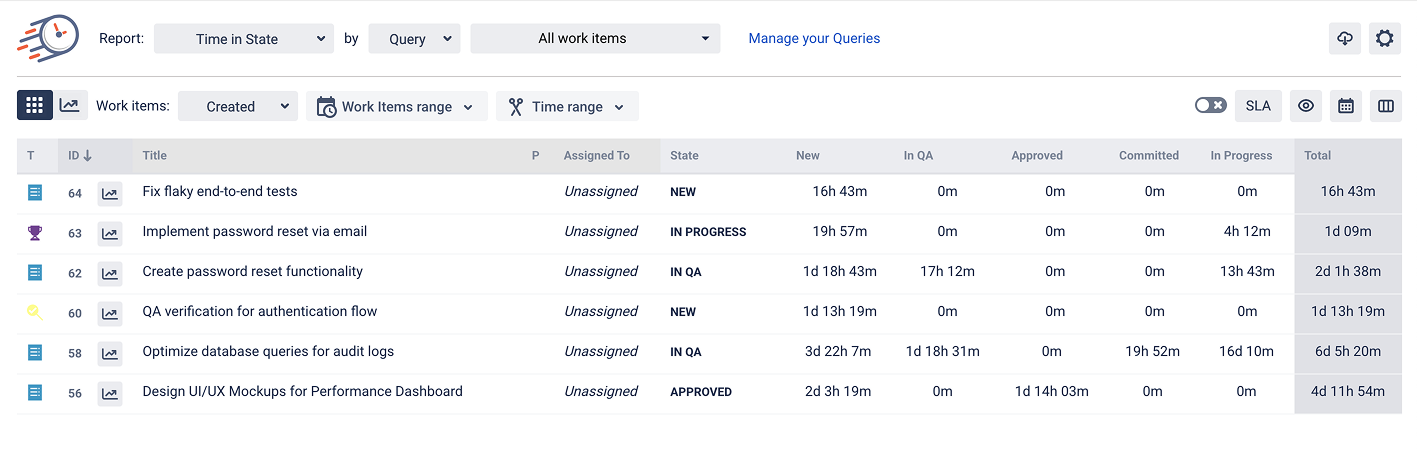
With Time in State reports, the bottleneck becomes obvious.
Now you can:
Adjust sprint scope
Rebalance QA workload
Add temporary QA capacity
Improve review processes
And most importantly - estimate future sprints with greater accuracy.
Better Estimation with Real Workflow Data
Time in Status helps answer practical sprint questions:
✔ What’s the average time in progress per task?
✔ How long do bugs remain in QA?
✔ Which states regularly cause delays?
✔ Are tasks staying unassigned too long?
When estimations are based on real cycle time data instead of assumptions, forecasts become more realistic.
This results in:
Greater sprint predictability
Higher delivery confidence
Fewer mid-sprint surprises
From Visibility to Continuous Improvement
Status time analysis doesn’t just enhance planning - it improves your entire workflow.
By reviewing time distribution across states, teams can:
Detect bottlenecks
Optimize handoffs
Reduce idle time
Strengthen cross-team collaboration
Over time, this leads to shorter cycle times and more stable velocity.
Why Azure DevOps Teams Choose Time in Status
For teams using Azure DevOps, Time in Status provides:
Detailed tracking of time spent in each state
Query-based filtering
Historical trend analysis
SLA monitoring (if required)
Clear visibility into total work item duration
It transforms raw work item data into actionable sprint insights.
Final Thoughts
Sprint planning shouldn’t rely on optimism - it should rely on evidence.
With Azure DevOps time tracking and structured bottleneck analysis, teams gain clarity on how long work actually spends in each workflow state.
When you understand real time distribution, you can:
Estimate more accurately
Plan with confidence
Deliver more consistently
With Time in State for Azure DevOps, workflow data becomes the foundation for better sprint outcomes.
And better sprint outcomes mean stronger teams, smoother delivery, and more predictable releases.

If you need help or want to ask questions, please contact SaaSJet Support or email us at support@saasjet.atlassian.net

Haven't used this add-on yet? Try it now >>>Time in State for Azure DevOps