
How a Product Team Improved Azure DevOps Workflow Optimization Using SLA
When the team started focusing on Azure DevOps workflow optimization, they quickly discovered something important: even though their board looked clean and well-structured, the actual task flow wasn’t as efficient as it seemed.
Some tasks moved forward quickly.
Others quietly remained in New, To Do, or In QA for hours, sometimes even days, without drawing attention.
During daily standups, the same questions kept surfacing:
“Why is this task still in New?”
“Has the review started yet?”
“Why is QA still waiting?”
Because Azure DevOps doesn’t automatically show how long a task stays in a specific state, delays were often noticed only after they had already caused issues. This reduced sprint predictability, slowed release cycles, and made it difficult to properly track task duration and overall workflow health.
Solution: Time in State + SLA
The team installed Time in State for Azure DevOps and began by reviewing the main report. For the first time, they could clearly see how long each work item had been sitting in every stage of the workflow.
Several issues immediately became visible:
One work item had been in New for 25 hours
Another had remained in In QA for half a day
A few tasks hadn’t moved from To Do since the previous afternoon
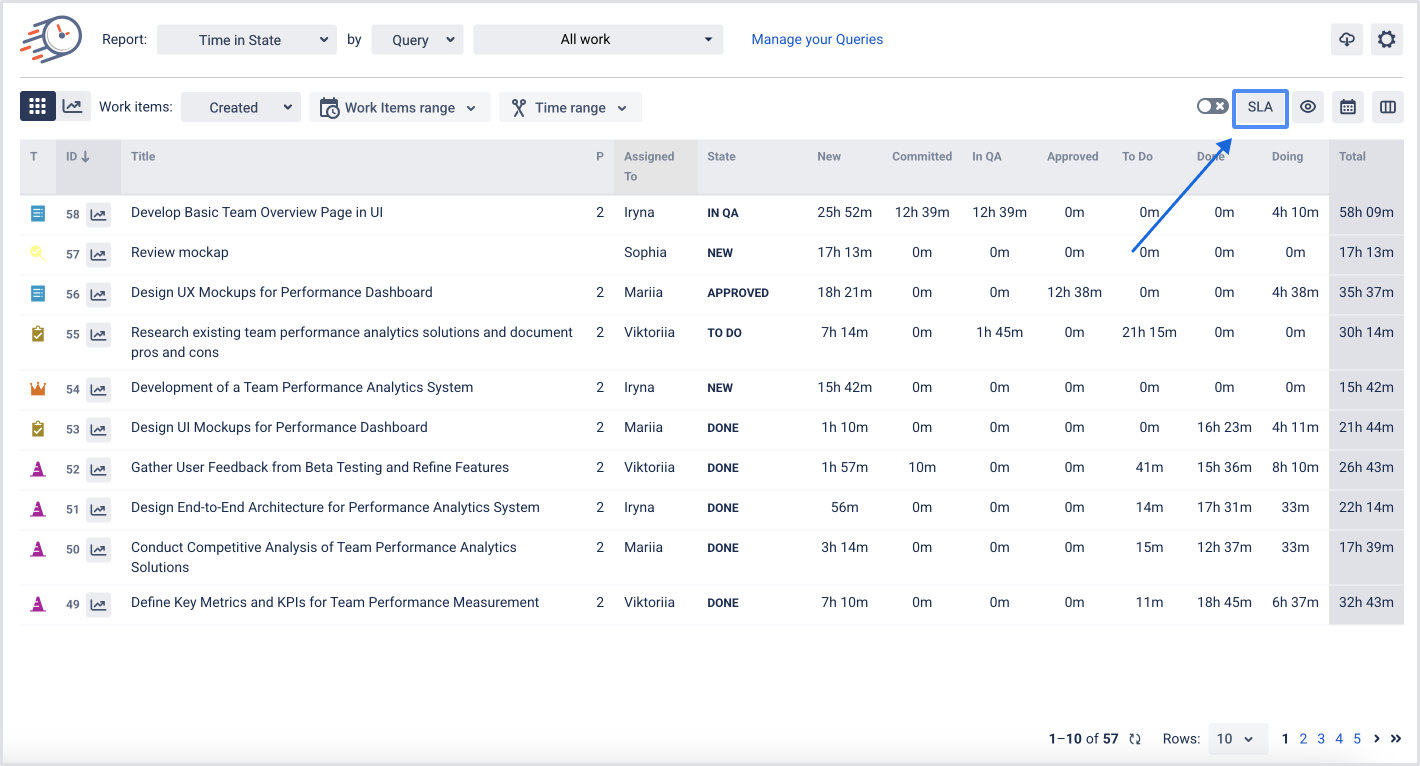
It became clear that their workflow performance didn’t match their expectations. To improve transparency and strengthen task duration monitoring, they decided to introduce SLA rules.
Setting Up SLA Rules
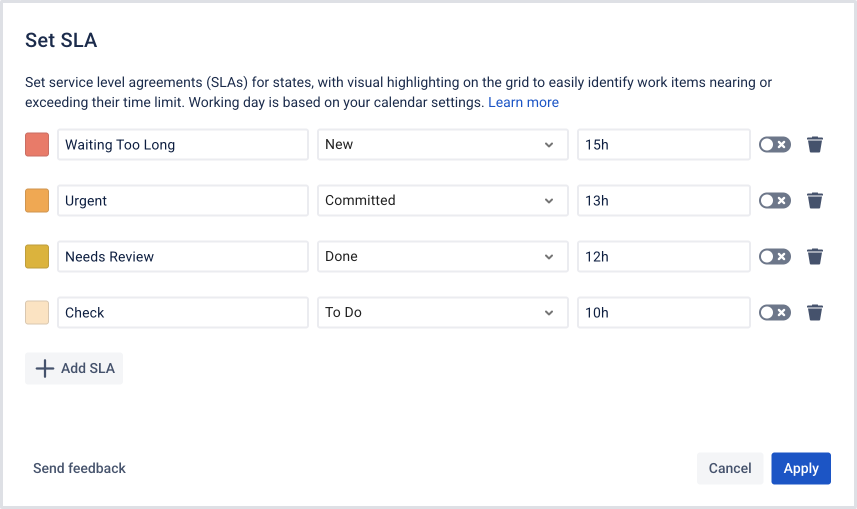
The team defined simple time limits for key workflow states:
New → maximum 15 hours
Committed → maximum 13 hours
Done → review required within 12 hours
To Do → maximum 10 hours
The setup took less than a minute. The interface allowed them to choose custom colors for warning and overdue states, making SLA indicators easy to understand during standups and sprint planning.
An important detail:
The team selects the SLA colors themselves, and Time in State applies those exact colors across the report.
What Changed After Enabling SLA
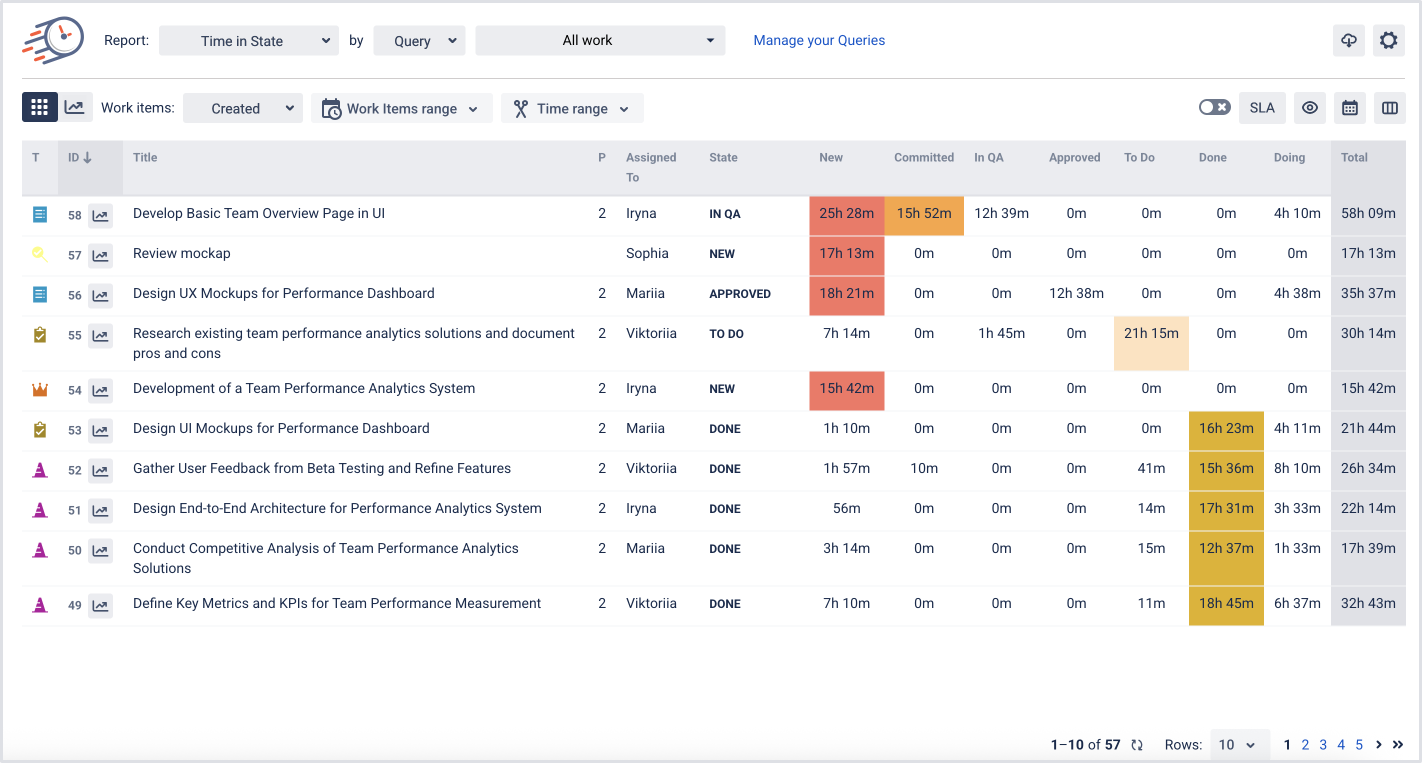
Once SLA rules were activated, the report became far more actionable:
Tasks exceeding SLA limits were highlighted in red
Tasks approaching the limit appeared in orange
Tasks requiring attention soon were marked in yellow
This gave the team an immediate, visual way to monitor task duration and improve Agile performance metrics with minimal effort.
Within just a few days, they noticed another major improvement: team communication became clearer and more data-driven. Instead of relying on assumptions or memory, discussions were based on real-time insights.
During standups, there was no more guessing:
QA knew exactly which tasks to test first
Reviewers could quickly prioritize overdue items
The Product Owner had real-time visibility into sprint progress
No task could “hide” or get lost on the board
Outcome: Greater Control and Predictability
After implementing SLA within Time in State, the team saw measurable improvements:
No more forgotten tasks
Delays became visible early
Cycle time and lead time became more predictable
Standups became shorter and more focused
Release planning became more reliable
But the most important benefit was simple:
Potential issues were identified before turning into real problems.
With SLA rules, color-coded alerts, and clear workflow data, the team moved from reactive firefighting to proactive process management. The result was smoother collaboration, better forecasting accuracy, and a significantly stronger Azure DevOps workflow optimization process.

If you need help or want to ask questions, please contact SaaSJet Support or email us at support@saasjet.atlassian.net

Haven't used this add-on yet? Try it now >>>Time in State for Azure DevOps