
Time in Status on Connect: Deprecation & Migration Timeline to Forge
What’s happening?
We’re moving Time in Status from the old Connect technology to the newer Forge technology.
Some features are already working on Forge.
For a while, both versions will work side by side inside the same app.
After the dates shown in the table, the old Connect version will be turned off, and only the Forge version will be used.
The JSON Data Feed is being replaced with a new API.
Our goal is to make this change as smooth as possible, so you can keep using Time in Status without interruptions.
App feature | Forge release date | Support for the old version on Connect | Final end of support for the old version on Connect |
|---|---|---|---|
Sprint performance report | RELEASED | SUSPENDED | SUSPENDED |
Time in status custom field | RELEASED | SUSPENDED | SUSPENDED |
Get started page | RELEASED | SUSPENDED | SUSPENDED |
Work item panel | RELEASED | SUSPENDED | SUSPENDED |
Main app page | RELEASED | SUSPENDED | SUSPENDED |
Work schedules | RELEASED | SUSPENDED | SUSPENDED |
Permissions | RELEASED | SUSPENDED | SUSPENDED |
Dashboard gadgets | RELEASED | SUSPENDED | SUSPENDED |
JSON Data feed link | RELEASED |
|
|
What do I need to do right now?
In most cases, the transition is designed to be as automatic as possible. Here’s a simple checklist:
Keep Time in Status updated
Make sure automatic app updates are enabled, or regularly install available updates from the Atlassian Marketplace.
Plan for Custom fields and Gadgets
Schedule time to recreate custom fields and recreate gadgets once the Forge versions are live in your instance.
Coordinate with your Jira admins
Let them know that permissions will be reset during the migration, and that they’ll need to reconfigure access afterward.
Watch for in-app notices
We will show clear messages inside the app when a module needs your attention.
Changes to pay attention to
Permissions
What’s changing
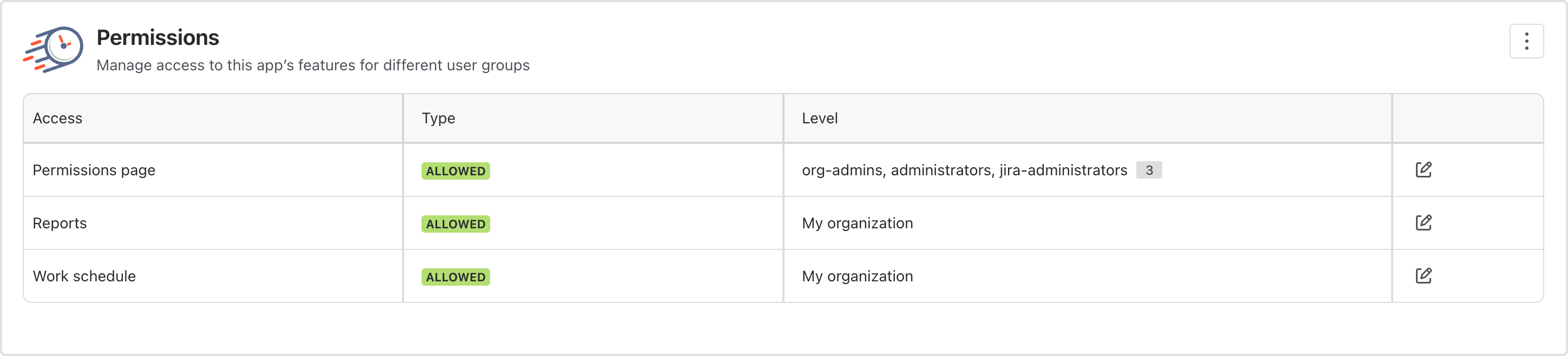
When Permissions move to Forge, the permission configuration will be reset.
After migration, access to Time in Status will temporarily be open to everyone until permissions are reconfigured.
What you need to do
Inform your Jira administrator about the upcoming permission reset.
After the migration:
Go to the app’s permissions settings.
Re-apply the permission scheme you want (e.g., limit access to specific groups, roles, or projects).
Dashboard gadgets
What’s changing
The Gadgets functionality will move to Forge by early 2026.
A “Recreate” button will be available for each of your existing gadgets.
What you need to do
Update the app when you see the prompt in Jira.
For each gadget:
Click Recreate to rebuild it using the Forge version.
Verify that filters, projects, and configurations are still correct.
You can do this gradually; your data won’t be lost.
JSON Data feed link
Update: The JSON data feed will be replaced with a new API. Because of this change, you’ll need to update your existing integrations. Please refer to the table above for the replacement date.
What’s changing
We know the Data feed is critical for many teams, especially for external BI, reporting, and integrations.
Because of that, the current implementation will remain available on Connect for now.
We will deprecate it only after we deliver a replacement that fully covers your needs.
What you need to do
No changes are required at this stage.
We’ll communicate well in advance when a new solution is ready and how to migrate.
A quick reminder: what is Atlassian Forge?
Atlassian Forge is Atlassian’s modern cloud app development platform. Apps built on Forge:
Run inside Atlassian’s own cloud infrastructure instead of third-party servers.
Integrate with Jira and Confluence through a secure, sandboxed runtime designed to isolate customer data and limit data egress.
Can take advantage of Atlassian’s data residency features, so in-scope data for Forge apps can stay in specific regions (EU, US, Germany, etc.), just like Jira Cloud itself.
Atlassian is increasingly investing in Forge as the standard platform for new cloud apps and as a key part of their security and trust program.
Why this transition matters for you
Moving Time in Status to Forge gives you:
Stronger security & compliance
Your data stays within Atlassian’s managed cloud instead of external infrastructure, which simplifies security reviews and helps with regulatory requirements.Better data residency story
Forge is designed to align app data with Atlassian’s data residency controls, which is important if your organization must keep data in a specific region.Higher reliability & performance over time
Forge apps benefit from Atlassian’s own scaling, monitoring and platform improvements.Future-proof features
Many new Atlassian capabilities and UI components arrive on Forge first. Moving now means we can ship improvements faster.

If you need help or want to ask questions, please contact SaaSJet Support or email us at support@saasjet.atlassian.net

Haven’t worked with the add-on yet? Give it a try
