
Issue History for Jira

Frequently Asked Questions Issue History

image-20260512-112955.png

Find quick answers about Issue History for Jira, including app functionality, reports, permissions, security, data privacy, and troubleshooting.

Q: Could you implement new features to the main functionality of the app?

A: Yes, we are open to creating custom reports. Describe your case and the functionality that you need, then send it to us by email ➡ support@saasjet.atlassian.net. We will get in touch with you and discuss all the details.

Q: Do you store customer data from the customer Atlassian instance?

A: We don’t store any customer data in our infrastructure, excluding hashed Atlassian user ID and app configs. Everything is processed interactively and displayed to end-users. We use application internal logs, but without customer-related data, including only details about request performance/status/error code.

Q: Is pricing based on the total number of Jira users in our organization or only on the users who have access to the app?

A: According to Jira pricing, we’re unable to manage the price relative to the number of actual users. Atlassian offers discounts on annual subscriptions, so you can pay less.

Q: How to calculate the price for the app?

A: Here’s a picture that displays how you can calculate the accurate price for a particular number of users. 

cHHwyQgOYLW0hVuSxH_o8iijcvttj1J8Cx7tlmB1ieR7k8c30_I6wqqYnWyp1JKAy_8VuKykbTzVqPKYPcR5n3difMzt3_LXP36ppvIlMsYXGvgL1hjaIZ8Et-PqonlhwTrOmff3

Each tier (<10, <100u, etc) has its own price. 

When you calculate a price for a particular number of users, you need to divide that number so that each part represents an exact tier. To calculate the price for your users (if there are more than 100), you need to calculate the price for each tier separately and sum them to get the final price. Look at the precise example in the picture above on how to get the necessary data. 

You can check if you have calculated correctly with the Atlassian calculator on the price page for any application. Just write down the number of users for calculating in the field you can see in the pic below.

Frame 1 (7).png


Q: Is it possible to leverage Issue History for Jira to assure CFR 21 Part 11 compliance?

A: Issue History for Jira helps in meeting FDA Part 11 criteria, such as:

  • to avoid false records and obtain an audit changelog (a history of all changes made to the issue or data).

  • to maintain tracking of deleted issues to ensure that nothing is lost.

  • to present data to the FDA inspection, you can export data to XLSX or CSV files.

*The plugin doesn't provide an option for an electronic signature.

Q: Is it possible to make a data backup and restore it?

A: Backup/Recovery files are necessary to restore systems to a condition when they have included the information and data that has been on the system just before the disaster.

The table below summarizes backup tape locations and retention periods:

Type

Location

Daily Backup (Server)

AWS Snapshots

Daily Backup (Database)

MongoDB Atlas Snapshots

Q: Do you have disaster recovery strategies to ensure company continuity in case the disruption occurs?

A: Our goal is to maintain information system availability, data integration, and business consistency. In the event of a disaster, we have process-level strategies to recover vital technology platforms and telecommunications infrastructure. Learn more

Q: Is it safe to work with Issue History (security policy)?

A: 1. The plugin is Cloud Fortified. So it provides increased security, dependability, and support.

  1. The app is a part of the Marketplace Bug Bounty Program. Learn more

  2. SaaSJet company has completed the Security Self-Assessment Program. Learn more

For more detailed information, please check our Security Page.

Q: Does Issue History for Jira app use customer data for AI or model training?

No.
Issue History for Jira does not use customer data to train AI, LLM, or GenAI models.

We do not:

  • use Jira data for AI training

  • share customer data with external AI providers for training purposes

  • build AI datasets from customer content

Customer data is processed only to provide the app’s functionality.

Q: Does the app include AI features?

The core app does not rely on AI or GenAI functionality.

We also provide an optional - Changes Report Assistant (Rovo Agent by Issue History). If used, it operates under Atlassian Rovo and Atlassian Intelligence policies.

The Rovo Agent is optional. Customers who do not enable or use it are not using any AI-powered functionality from Issue History for Jira.

Q: I don't have access to the app sections. What should I do?

A: Access to Issue History for Jira app sections depends on your Jira permissions and the app configuration set by your Jira admin.

If you cannot access certain app sections, please:

  1. Contact your Jira admin.

  2. Make sure you have permission to access the required Jira projects and work items.

  3. Verify that the app sections are enabled for your user role or group.
    ddff9da1-146c-4d52-b971-3b9676b85d79.png
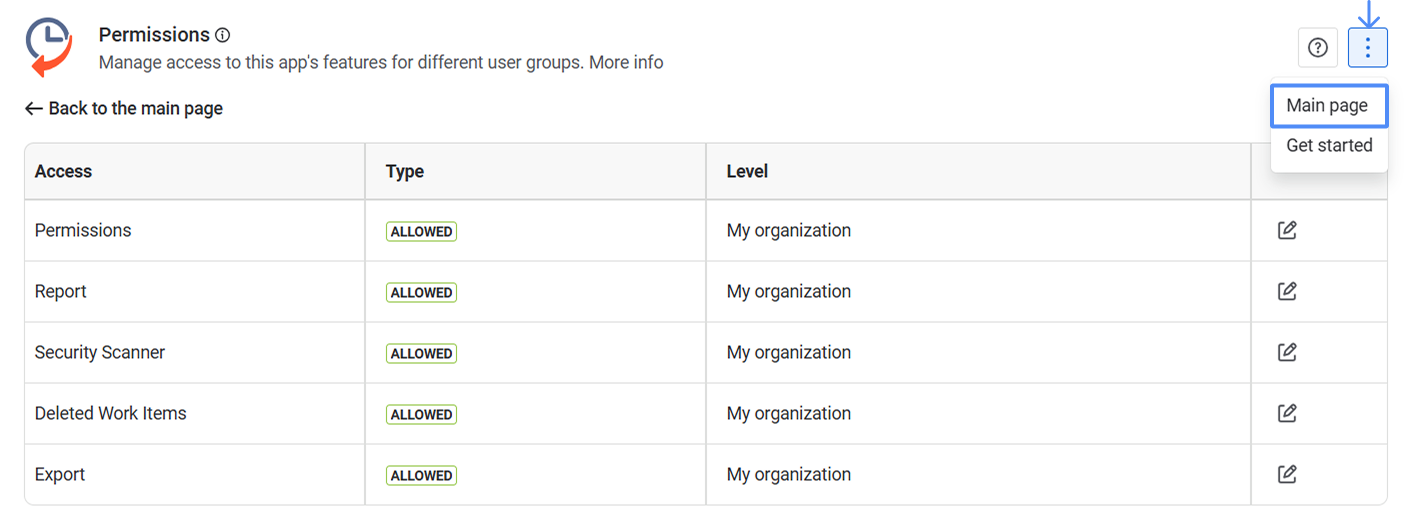
Q: I entered the Permissions page. How do I go back to the main page?

Open the three-dot app menu and select “Main Page”.

Frame 2 (3).png


Q: How many groups are supported for access management in the app?

Issue History for Jira supports multiple Jira user groups for access management. There is no strict limitation on the number of groups you can configure.

You can grant or restrict access to specific app sections based on your organization’s Jira groups and permission setup.

Learn more about app’s Permissions

Q: Why can't I restrict permissions for the admin group?

Administrative groups (org-admins) have all rights by default and therefore cannot be disabled.

If you need help or have any other questions, please contact SaaSJet Support or email us at support@saasjet.atlassian.net.