
The Capture for monday.com extension helps teams streamline issue reporting, feedback sharing, and task creation — all visually.
Here’s what you can do once the extension is installed and connected:
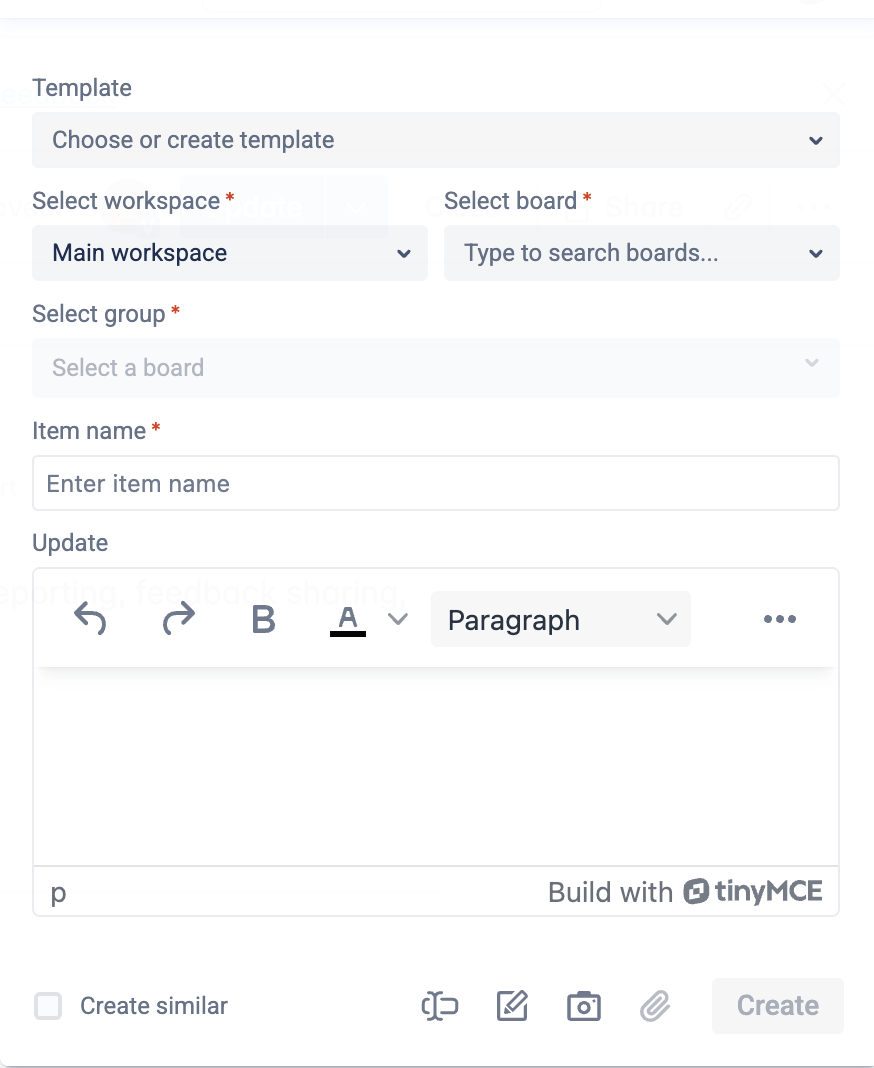
✅ Key Features
🗂 Create tasks in any monday workspace
Choose your Workspace, then select a Board and Group where your task will be added.
The extension integrates seamlessly with your monday environment.
📝 Fill in item details with ease
Set the Item name (task title) and enter the task description in the Update field — just like you would in a regular monday item.
📌 Use “Create Similar” for faster logging
Enable this option to remember your last used workspace, board, group, and other settings.
Perfect for creating multiple related tasks in one session.
📎 Attach files and screenshots
Upload files or paste screenshots directly into the task. No need to switch tabs or drag-and-drop — everything happens in one place.
📸 Take annotated screenshots
Capture part of your screen, annotate it with arrows or shapes, and instantly attach it to the task’s Update field.
🖍 Use Page Marker to highlight feedback
Draw directly on your screen before capturing. Highlight UI issues, design comments, or visual bugs clearly.
✏️ Edit page text before capturing
Switch to Text Edit Mode to temporarily edit web page content before taking a screenshot — ideal for UX copy suggestions or layout feedback.
🔗 Link feedback to specific page elements
Select an area of the web page and link your task directly to it, so developers or designers know exactly where to look.
Request a demo call
Keep track of every work item with Capture for monday.com
Give app a try